
How to Find the BPM of Any Song (7 Proven Methods)
Learn how to find the BPM of any song using Tap Tempo, DJ software, DAWs, apps, and more. Compare seven proven methods to choose the right one.
Quick Answer
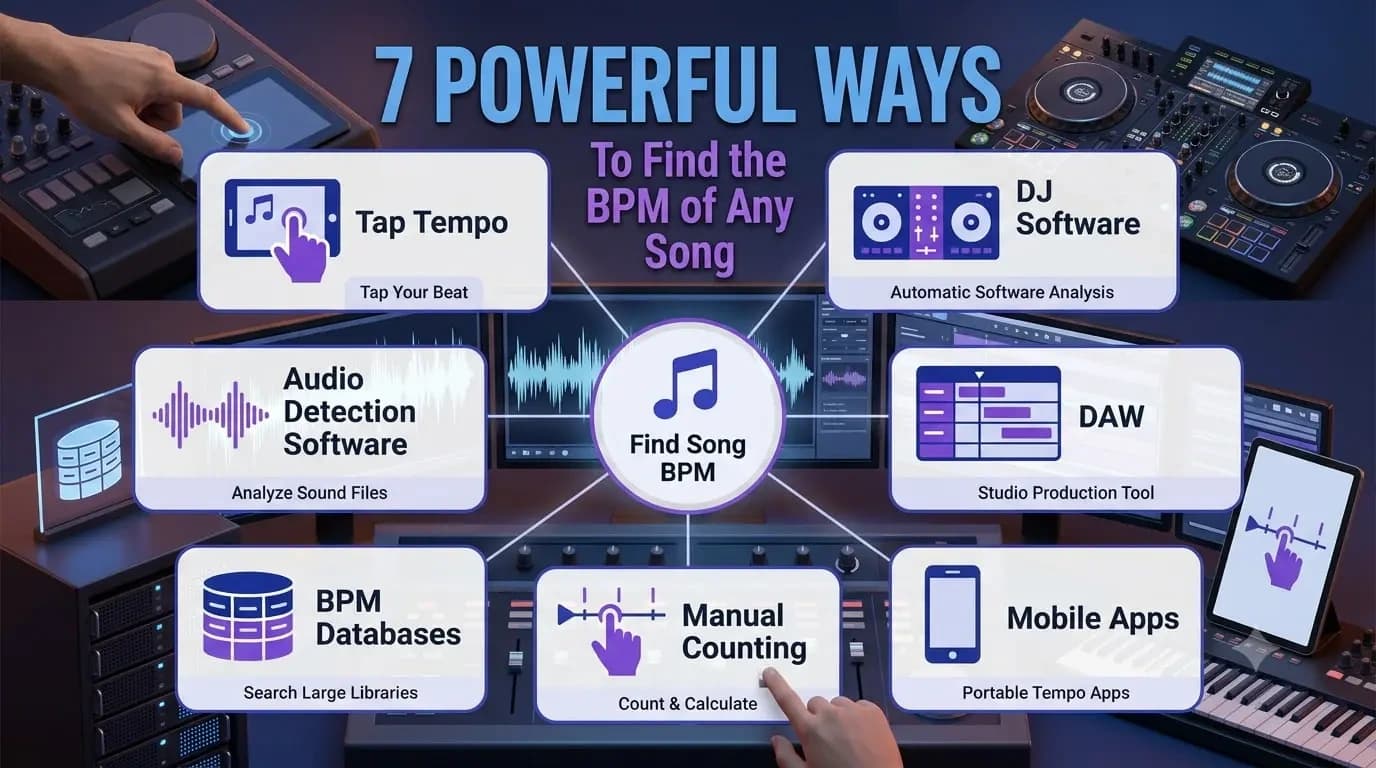
There isn't one universal way to find the BPM of a song because the best method depends on your goal. If you need a quick estimate while listening to music, Tap Tempo is often the fastest option. DJs typically rely on automatic BPM analysis inside DJ software, while producers prefer DAWs for project accuracy. This guide compares seven proven methods, explaining when each one works best and where it may fall short.
Key Takeaways
- No single BPM detection method is universally best , the right approach depends entirely on your goal.
- Tap Tempo is the fastest option when you're listening to music and need a quick estimate without software.
- DJ software, DAWs, mobile apps, databases, and dedicated analysis tools each serve different professional workflows.
- Verifying tempo manually on important tracks takes seconds but can prevent hours of timing problems later.
Why Finding BPM Matters
You don't usually search for a song's BPM because you're interested in a number. You're searching because you need to accomplish something.
Maybe you're building a DJ playlist with smooth transitions, recreating a song inside your DAW, practising an instrument with a metronome, or preparing a remix that needs to stay perfectly in time. Whatever the goal, finding the correct BPM is often the first step.
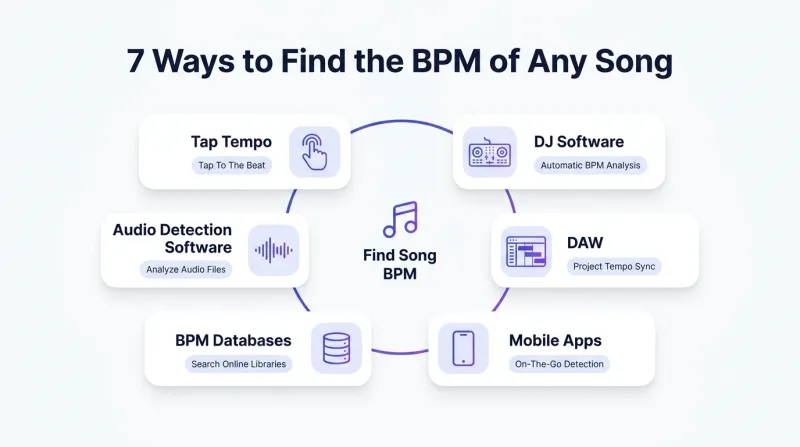
Today, there are plenty of ways to discover a song's tempo. DJ software, digital audio workstations, mobile apps, online databases, and even manual techniques can all help you find the BPM. The challenge isn't finding a method. It's choosing the one that best fits your workflow.
A DJ preparing for a live set doesn't approach tempo detection the same way as a producer working on a remix or a musician learning songs by ear. The fastest method isn't always the most practical, and the most accurate method isn't always necessary.
In this guide, you'll compare seven proven BPM detection methods, understand where each one performs best, and learn how experienced musicians choose the right approach for different situations. By the end, you'll know exactly which method fits your own workflow.
Who Is This Guide For?
This guide is designed for anyone who needs to identify a song's tempo accurately, including:
- DJs preparing playlists and live performances.
- Music producers building projects inside a DAW.
- Musicians practicing with a metronome.
- Audio engineers analysing recordings.
- Music teachers and students learning rhythm.
- Anyone curious about the BPM of a favourite song.
Whether you're looking for a quick estimate or professional-level accuracy, you'll find a method that matches your workflow.
Every Workflow Starts with a Different Objective
Imagine three people opening the exact same song.
A DJ wants to know whether it can be mixed smoothly into the next track. A producer wants imported audio to line up perfectly with the DAW's timeline. A drummer simply wants to practise difficult fills at a slower speed before gradually increasing the tempo.
All three people need the song's BPM, yet they're solving entirely different problems.
That's why there isn't one universal tempo detection method that works best for everyone. The right approach depends on what you're trying to achieve rather than the number you're trying to find.
Accurate Tempo Saves More Time Than Most People Realise
Tempo mistakes often don't become obvious immediately.
For example, a producer might import a commercial song into a recording session and set the project tempo based on an incorrect BPM value. During the first few bars, everything appears perfectly synchronised. A few minutes later, however, newly recorded instruments, MIDI parts, or drum loops begin drifting away from the original recording.
The problem usually isn't the performance. It's the starting tempo.
Spending an extra minute verifying the BPM at the beginning of a project is often far quicker than fixing timing problems after hours of recording and editing.
The same principle applies outside the studio. A DJ preparing a playlist may organise dozens of songs according to their detected BPM values. If even one important track has been analysed incorrectly, transitions that sounded perfect during preparation can suddenly become awkward during a live performance.
Small tempo errors rarely stay small. They usually become much more noticeable once real work begins.
Technology Is Excellent, But It Isn't Infallible
Modern software has become remarkably good at detecting tempo automatically.
For electronic dance music, pop productions, and songs recorded to a click track, automatic BPM analysis is often extremely accurate. In many situations, the detected value is more than sufficient for everyday use.
Experienced musicians, however, understand that software is making an intelligent estimate rather than reading hidden information stored inside the recording.
Songs featuring live drummers, expressive tempo changes, vintage recordings, jazz performances, or complex rhythmic patterns can occasionally confuse automatic detection systems. When that happens, the displayed BPM may be close to the correct value without being completely accurate.
This is one reason experienced DJs and producers often verify important tracks instead of accepting every automatic result without question.
Trust the software. But don't stop trusting your ears.
Not Every Song Has One Fixed Tempo
Another common misconception is that every song maintains exactly the same BPM from beginning to end.
That assumption holds true for many modern studio productions, particularly those created around digital click tracks. Outside those situations, music becomes far less predictable.
- Live bands naturally speed up during energetic sections and relax during quieter passages.
- Classical performances intentionally change pace to support musical expression.
- Older analogue recordings may drift slightly because of the recording technology available at the time.
When this happens, searching for one perfect BPM becomes less useful than identifying the song's dominant tempo.
Recognising this difference helps you interpret tempo analysis more accurately and prevents you from assuming that every inconsistent result is a software error.
We'll explore this subject in much greater depth in our guide on Why Songs Don't Always Have One Fixed BPM, since understanding tempo variation deserves a dedicated discussion of its own.
Choosing the Right Method Is More Important Than Choosing the Fastest One
Many people ask,
"What's the best way to find a song's BPM?"
Professionals usually ask a different question.
"Which method makes the most sense for this specific situation?"
If you're organising thousands of tracks before a DJ performance, automatic analysis is likely to be the most efficient option.
If you're listening to music on a streaming platform where no audio file is available, manually tapping along with the beat may produce an answer far more quickly than searching multiple databases. If you're recreating a commercial recording inside a DAW, confirming the tempo using more than one method can save considerable editing time later.
Finding the correct BPM isn't simply about getting the right number. It's about reaching that number using the workflow that best matches the task in front of you.
In the next sections, we'll compare seven proven BPM detection methods, explain when each one works best, and help you decide which approach deserves a place in your own musical workflow.
Method 1: Tap Tempo
Among all the ways to find a song's BPM, Tap Tempo remains one of the simplest and surprisingly one of the most practical.
Instead of asking software to analyse an audio file, this method relies on your own sense of rhythm. You simply tap in time with the music while a Tap Tempo tool measures the intervals between your taps and converts them into an estimated BPM.
The concept is straightforward, but its usefulness often surprises people. Unlike many automatic detection methods, Tap Tempo doesn't require an audio file, embedded metadata, or specialised software. As long as you can hear the beat, you can estimate the tempo.
That's exactly why musicians continue to use it, even though automatic BPM detection has become widely available.
Imagine you're listening to music on YouTube, Spotify, the radio, or even a live performance. You can't always upload that audio into professional software, but you can always tap along with the rhythm. Within a few seconds, you'll have a reliable tempo estimate that is often accurate enough for rehearsal, playlist planning, or quick musical decisions.
That flexibility makes Tap Tempo one of the few methods that works almost everywhere.
Of course, the result depends on one important factor , your consistency.
If your tapping speeds up or slows down, the calculated BPM will naturally become less reliable. This is why experienced users rarely stop after three or four taps. They continue tapping for several bars until their rhythm settles into a consistent pattern, allowing the calculation to stabilise.
Common Mistake
Tapping every drum hit instead of following the main pulse. Beginners often tap every kick or snare they hear, while experienced musicians listen for the primary beat that defines the groove. Learning to recognise that pulse improves accuracy far more than tapping faster or harder.
One advantage that isn't discussed very often is verification.
Many DJs use automatic BPM detection while organising their music libraries, but before an important performance they sometimes perform a quick Tap Tempo check on songs with live drums, older recordings, or unusual rhythmic structures. It only takes a few seconds, yet it provides confidence that the displayed BPM actually matches what they'll hear during the performance.
Tap Tempo isn't trying to replace professional analysis software. Instead, it fills the situations where automation isn't available, isn't practical, or simply needs a quick second opinion.
If you need a fast manual way to estimate a song's tempo, our Tap Tempo tool lets you start tapping immediately without installing software or uploading audio files.
Pro Tip
Many professional DJs use Tap Tempo to verify songs that contain live drums or noticeable tempo variations before adding them to performance playlists. Spending a few extra seconds checking the tempo manually can prevent beat grid problems during a live mix.
Method 2: DJ Software
If Tap Tempo represents the fastest manual approach, DJ software represents the fastest automatic workflow for managing large music libraries.
Applications such as Serato DJ Pro, rekordbox, Traktor Pro, and VirtualDJ analyse tracks as they're imported into your collection. During this process, the software identifies rhythmic patterns, estimates the BPM, and often builds beat grids that help with cue points, looping, and synchronised playback.
For DJs managing hundreds or even thousands of songs, this automation is invaluable. Manually checking every track would consume hours of preparation, while modern software can analyse an entire library with very little user input.
That efficiency explains why automatic BPM detection has become a standard part of professional DJ workflows.
However, experienced DJs understand an important detail that beginners often overlook.
Automatic analysis is designed to be fast, not infallible.
Most electronic dance music is recorded with an extremely stable tempo, making automatic detection highly reliable. Songs recorded with live musicians tell a different story. Funk, jazz, classic rock, orchestral recordings, and live performances frequently contain subtle tempo variations that make automatic analysis more challenging.
In those situations, the displayed BPM may still be close to the correct value, but the beat grid can slowly drift away from the actual performance as the song progresses.
This doesn't necessarily indicate poor software. Instead, it reflects the reality that many recordings weren't created with perfectly constant timing.
Professional DJs rarely panic when this happens.
They simply recognise that software is a starting point rather than the final authority. Before relying on an important track during a performance, they'll often preview the song, check whether the beat grid remains aligned throughout the recording, and make adjustments if necessary.
That habit takes very little time but can prevent awkward transitions during a live set.
Another advantage of DJ software is that BPM analysis becomes part of a much larger organisational workflow. Tempo information can be combined with musical key, genre, energy level, playlists, and performance history, allowing DJs to search their collections in ways that simply aren't possible with manual methods alone.
If your primary goal is organising and performing with a large music library, automatic BPM detection inside professional DJ software is usually the most efficient solution. For individual songs where absolute confidence matters, many performers still combine it with a quick manual verification before stepping onto the stage.
Pro Tip
Even when DJ software detects BPM accurately, always preview beat grids on tracks with live instrumentation. A quick visual check before your performance can prevent beat grid drift during critical transitions.
Method 3: Digital Audio Workstations (DAWs)
For music producers, composers, and recording engineers, the most practical place to determine a song's BPM is often the software they're already using every day.
Digital Audio Workstations such as Ableton Live, FL Studio, Logic Pro, Cubase, Pro Tools, and Studio One include tempo detection features that integrate directly into the production process. Instead of switching between multiple applications, producers can analyse recordings, adjust project tempo, and begin editing without leaving their working environment.
This becomes especially valuable when recreating commercial songs, producing remixes, or importing live recordings into an existing session.
Unlike DJ software, which focuses primarily on playback and performance, DAWs are designed around editing and production. Tempo detection therefore becomes part of a much larger workflow that includes recording, arranging, quantising, MIDI programming, and time-stretching.
Imagine importing an acapella into your DAW.
Before recording new instruments or programming drums, you'll want the project tempo to match the original performance as closely as possible. Starting with an incorrect BPM may not create obvious problems immediately, but as additional tracks are recorded, small timing differences can gradually become significant editing issues.
This is one reason experienced producers rarely treat tempo detection as a one-click process.
They analyse the recording, listen carefully, check important sections manually, and confirm that the detected tempo remains consistent throughout the song. Spending an extra minute at the beginning often prevents far more complicated corrections later.
DAWs also provide a level of visual feedback that many other BPM detection methods cannot. Waveforms, transient markers, grids, and timeline editing allow producers to see whether rhythmic events actually align with the detected tempo instead of relying solely on a displayed number.
For studio work, that combination of automatic analysis and manual verification makes DAWs one of the most dependable environments for tempo detection.
If your goal involves recording, editing, producing, or remixing music, analysing tempo inside your DAW is usually the workflow that creates the fewest interruptions while delivering the greatest long-term accuracy.
Pro Tip
Experienced producers usually confirm a song's BPM before recording MIDI instruments or programming drums. Verifying the tempo at the beginning of a project is far easier than correcting timing problems after multiple tracks have already been recorded.
Method 4: Mobile Apps
There are plenty of situations where opening professional software simply isn't practical.
You might be rehearsing with your band, listening to a song during your commute, attending a concert, or discussing music with friends. In moments like these, reaching for a laptop isn't realistic, but pulling out your phone is.
That's exactly where mobile BPM apps prove their value.
Most tempo detection apps fall into one of two categories. Some use manual Tap Tempo functionality, allowing you to tap along with the beat just as you would on a desktop tool. Others attempt to analyse the music automatically through your phone's microphone or imported audio files.
Both approaches have their place, but they serve different purposes.
Manual tapping generally gives you greater control because you're deciding which beat to follow. Automatic detection offers convenience, especially when you need a quick estimate, but the quality of the result depends heavily on the recording environment. Background conversations, room acoustics, audience noise, or overlapping instruments can all make tempo detection more challenging.
Imagine standing near the back of a live concert.
The music reaches your phone after mixing with crowd noise, echoes, and audience applause. An automatic detector may struggle to isolate the beat accurately, while manually tapping along with the performance often produces a more dependable estimate.
This is why experienced musicians don't think of mobile apps as replacements for professional software.
Instead, they treat them as portable companions.
- A guitarist might quickly check the approximate tempo before rehearsal.
- A music teacher may confirm the speed of an exercise during a lesson.
- A drummer could verify practice tempo without needing to return to a computer.
The convenience isn't just about speed , it's about having useful information available exactly when you need it.
If accuracy is critical for production or performance, it's still worth confirming the BPM later using dedicated software. For everyday musical decisions, however, a good mobile app often provides more than enough precision while keeping your workflow simple and uninterrupted.
Pro Tip
Use manual tap mode in mobile apps when you're in a noisy environment. Automatic detection through the microphone can be unreliable with background noise, but your own tapping will stay consistent regardless of the surroundings.
Method 5: Manual Counting
Long before software could analyse audio automatically, musicians relied on one skill above everything else.
They counted.
Although manual counting requires a little patience, it's still one of the most reliable ways to understand a song's tempo because you're listening carefully instead of depending on an algorithm.
The basic idea is simple:
- Choose a steady section of the song where the beat is clear.
- Count the beats for 15 or 30 seconds (or a full minute for maximum accuracy).
- Multiply by the appropriate factor to get beats per minute.
- Repeat once or twice to confirm consistency.
The method itself isn't difficult. The challenge lies in identifying the correct pulse.
Beginners often count every kick drum, hi-hat, or rhythmic accent they hear. Experienced musicians focus on the main beat that drives the song forward. Once you learn to recognise that pulse consistently, manual counting becomes surprisingly dependable.
This approach also develops something software never can , your internal sense of rhythm.
Teachers frequently encourage students to count tempos manually because the exercise strengthens musical awareness. Over time, many musicians become capable of estimating approximate BPM ranges without using any tools at all. That ability doesn't replace technology, but it certainly makes working with tempo much easier. If you've counted the beats manually, you can verify the result using our BPM Calculator.
Manual counting is particularly useful when analysing music that confuses automatic detection systems. Songs with changing dynamics, unusual percussion, expressive timing, or incomplete recordings often benefit from careful listening rather than automated analysis.
It isn't the fastest method in this guide, but it remains one of the most educational.
Rather than simply receiving a BPM value, you begin understanding how the rhythm itself is constructed , a skill that becomes increasingly valuable as your musical experience grows.
Pro Tip
Start by counting for 15 seconds and multiply by 4. As your accuracy improves, try shorter intervals to develop a stronger internal sense of rhythm. Cross-check your result with a Tap Tempo tool to confirm.
Method 6: Online BPM Databases
Sometimes the quickest solution isn't analysing the song yourself at all.
If a track has already been analysed and catalogued, an online BPM database may provide the information within seconds.
Over the years, several music databases have collected tempo information for millions of commercially released songs. DJs, producers, playlist curators, and music enthusiasts regularly use these resources to check BPM before preparing performances, creating playlists, or planning production sessions. The biggest advantage is obvious.
There's no need to download software, upload audio files, or perform manual analysis. If the song exists in the database, the BPM is often available almost instantly. However, it's important to remember that these databases aren't infallible.
Different sources sometimes report slightly different BPM values for the same recording. This may happen because one database analysed a radio edit while another indexed the album version. Live performances, remastered editions, and extended mixes can also differ from their original releases.
For that reason, experienced musicians rarely treat online databases as unquestionable sources. If you already know the approximate tempo range, our Music Tempo Chart can help you compare common BPM ranges across different music genres.
Instead, they use them as excellent starting points.
If the displayed BPM matches your listening experience, there's usually no reason to investigate further. If something feels inconsistent, verifying the tempo manually or analysing the recording yourself is often the smarter decision.
Online databases work particularly well during the early stages of planning. DJs can organise playlists more quickly, producers can estimate project settings before importing audio, and musicians can begin practising without spending unnecessary time measuring tempo themselves.
Used wisely, these databases save considerable time while complementing , not replacing , the other tempo detection methods discussed throughout this guide.
Pro Tip
When a database shows multiple BPM values for the same song, the correct tempo may depend on which version of the recording you're working with. Always verify against the actual audio before relying on the result for production or performance.
Method 7: Audio Detection Software
If your priority is accuracy rather than convenience, dedicated audio detection software deserves serious consideration.
Unlike mobile apps or online databases, these tools are designed specifically to analyse audio recordings in detail. They examine rhythmic transients, waveform patterns, and beat placement to estimate tempo with a higher level of precision. Many applications also provide additional information such as beat markers, waveform analysis, spectral displays, and timing corrections that are useful during professional editing.
For producers, remix artists, and audio engineers, this level of detail can make a significant difference.
Consider a producer preparing a remix from an older recording. The original song may contain subtle tempo fluctuations that aren't immediately obvious when listening casually. Basic BPM detection software might display a single value, while advanced analysis can reveal exactly where the performance speeds up or slows down. That information makes it much easier to align loops, edit transitions, or build new arrangements around the original recording.
These tools are also valuable when restoring archived recordings, analysing live performances, or preparing music for film and television projects where timing precision is especially important.
However, higher accuracy usually comes with greater complexity.
Dedicated analysis software often requires installation, project setup, and a basic understanding of audio editing. For someone who simply wants to know the tempo of a song before practising guitar or creating a playlist, this level of detail is usually unnecessary.
This is a good example of choosing the right tool for the right job.
Professional software offers excellent analytical capabilities, but not every musical task requires that level of precision. Spending ten minutes analysing a recording to answer a question that could be solved in thirty seconds with another method doesn't necessarily improve the outcome.
The most experienced musicians understand this balance well. They use advanced analysis when the project demands it and simpler methods when speed matters more than microscopic precision.
Knowing when not to use a powerful tool is often just as valuable as knowing how to use one.
Pro Tip
If different BPM detection methods produce slightly different results, compare the recording manually instead of assuming one tool is automatically correct. The best result is the one that matches the actual musical pulse of the performance.
Comparing the Seven Methods
After exploring each approach individually, one conclusion becomes clear.
No single method is universally better than the others.
Each technique solves a different problem, and understanding those differences helps you choose the most efficient workflow instead of repeatedly relying on the same approach.
| Method | Speed | Accuracy | Best For |
|---|---|---|---|
| Tap Tempo | Very Fast | High (with consistent tapping) | Quick estimates, live music, streaming audio |
| DJ Software | Very Fast | High | DJs managing large music libraries |
| Digital Audio Workstations | Moderate | Very High | Music production, remixing, recording sessions |
| Mobile Apps | Fast | Moderate to High | Rehearsals, practice sessions, everyday use |
| Manual Counting | Moderate | High | Ear training, education, verifying difficult recordings |
| Online BPM Databases | Instant | Usually High | Popular commercial releases and playlist planning |
| Audio Detection Software | Moderate | Excellent | Professional analysis, restoration, advanced production |
The comparison above shouldn't be viewed as a ranking.
Instead, think of it as a decision guide.
A producer working on a commercial remix will naturally choose a different workflow from a drummer practising at home or a DJ preparing tomorrow night's performance. Selecting the right method is less about finding the highest accuracy score and more about choosing the level of precision your situation actually requires.
Which Method Should You Use?
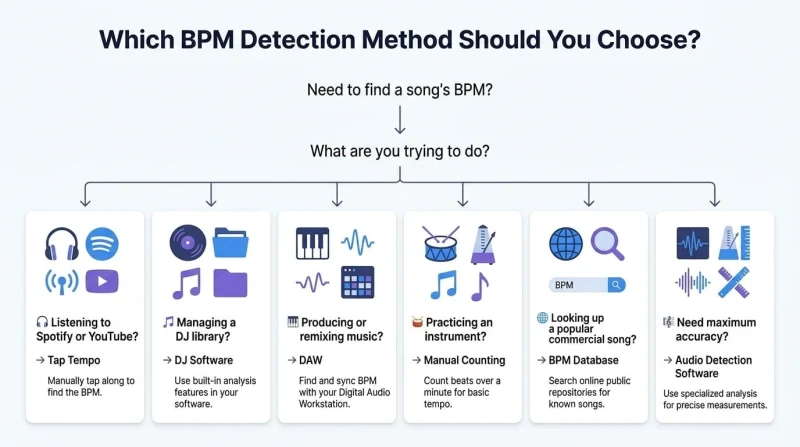
The best BPM detection method depends on what you're trying to accomplish.
Quick Reference
- Quick estimate while listening: Tap Tempo
- Managing a large music library: DJ Software
- Music production and remixing: DAWs
- Practice and casual use: Mobile Apps
- Ear training and education: Manual Counting
- Instant results for commercial songs: Online BPM Databases
- Maximum accuracy required: Audio Detection Software
Experienced musicians rarely rely on just one method. Instead, they choose the tool that best fits the situation, combining automatic detection with manual verification whenever accuracy matters.
The right method isn't necessarily the fastest or the most advanced. It's the one that helps you make confident musical decisions with the least amount of effort.
Continue Learning
If you'd like to understand tempo in greater depth, these guides explore topics that naturally build on what you've learned here:
Each article explores a specific aspect of tempo detection without repeating the concepts covered in this guide, helping you build a deeper understanding of rhythm, timing, and musical performance.
Ready to Find the BPM?
Reading about tempo detection is useful.
Putting it into practice is even better.
If you need a fast, reliable way to estimate the BPM of any song you're listening to, try our Tap Tempo tool. Simply tap along with the beat, let the calculator measure your rhythm, and you'll have a tempo estimate in seconds.
Whether you're practising an instrument, preparing a DJ set, analysing a recording, or simply satisfying your curiosity, it's one of the quickest ways to turn rhythm into useful information.
Sources & References
To ensure technical accuracy and reflect current industry practices, this guide was researched using documentation and educational resources from respected organizations and professional music technology publications, including:
- Audio Engineering Society (AES) – Industry research and standards for audio engineering and music technology.
- Sound On Sound – Professional articles covering music production, recording, mixing, and studio workflows.
- Ableton Live User Manual – Official documentation for tempo analysis, warping, and production workflows.
- Apple Logic Pro User Guide – Official reference for tempo detection and project synchronization in Logic Pro.
- Steinberg Cubase Documentation – Official guidance for tempo mapping, beat detection, and audio editing.
These resources were used to verify technical concepts alongside practical production workflows. All explanations, comparisons, and recommendations have been independently written and reviewed by the TheTapTempo Editorial Team.
This article has been researched, written, and reviewed according to our Editorial Policy.
Frequently Asked Questions
Common questions about finding the BPM of a song.