
How Accurate Is Tap Tempo? Human vs Software BPM Detection
Discover how accurate Tap Tempo really is. Compare manual tapping with software BPM detection, learn what affects accuracy, and find out when you can trust the results.
Quick Answer
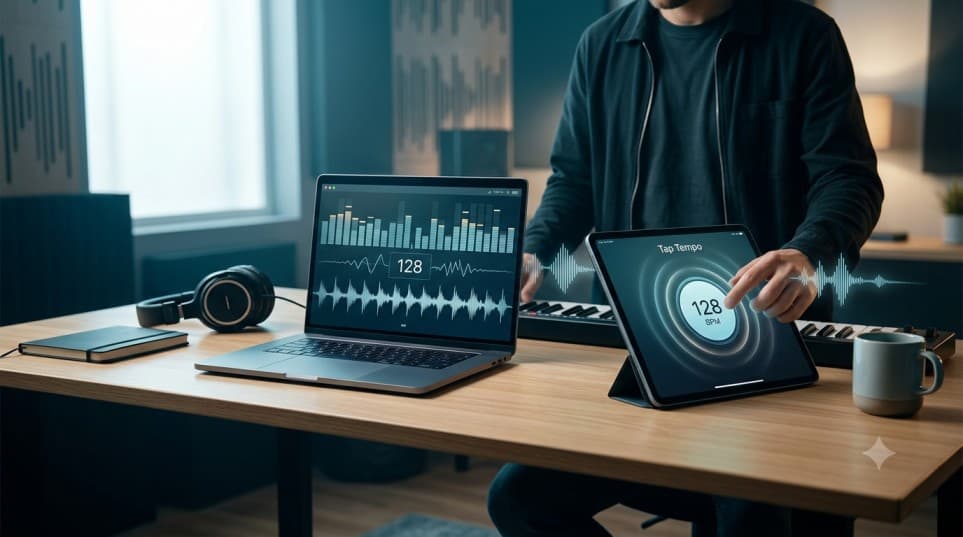
Tap Tempo can be highly accurate when used correctly. With consistent tapping over 8–12 beats, experienced users can often estimate a song's tempo within 1–2 BPM of dedicated BPM analysis software. Actual accuracy depends on the user's timing consistency, the complexity of the music, and the stability of the underlying beat.
Key Takeaways
- Consistent tapping over 8–12 beats can achieve 1–2 BPM accuracy.
- Human consistency matters more than device speed or software algorithms.
- EDM, Pop, and Hip-Hop are easiest for Tap Tempo; Classical and Jazz are hardest.
- Automatic software remains best for large libraries and complex multi-tempo recordings.
Introduction
You've tapped along with a song, watched the BPM appear on the screen, and probably wondered one thing. Can I actually trust this number?
The short answer is yes, but only if you understand what influences tapping accuracy. Many people assume Tap Tempo is nothing more than an estimate, while automatic software always produces the correct answer. In reality, the difference isn't nearly that simple. Modern BPM analysis software is incredibly powerful, but it also has limitations, especially when songs contain tempo changes, live drummers, or complex rhythmic patterns. Likewise, Tap Tempo isn't simply a guessing tool. When used with a steady rhythm and consistent tapping, it can produce remarkably reliable results for many real-world situations.
The key isn't whether Tap Tempo is accurate or inaccurate. The key is knowing when it performs exceptionally well, when its accuracy naturally decreases, and how a few small adjustments can significantly improve your results.
This guide explores the factors that influence Tap Tempo accuracy, compares manual tapping with automatic BPM detection, and explains why many experienced musicians still rely on Tap Tempo alongside professional software instead of treating the two methods as competitors.
Who Is This Guide For?
This guide is useful if you regularly work with tempo and want to understand how much you can trust manual BPM detection. It is especially relevant for:
- DJs preparing playlists and live performances.
- Music producers working inside a DAW.
- Drummers and instrumentalists practising with consistent timing.
- Music students learning rhythm and tempo.
- Fitness instructors creating music-based workouts.
- Anyone who wants a dependable way to estimate a song's BPM.
Whether you're checking the tempo of a favourite track or preparing for a professional performance, understanding what affects Tap Tempo accuracy will help you achieve more consistent results.
Does Tap Tempo Give Correct BPM?
Yes, in most situations, it does.
For songs with a clear, consistent beat, Tap Tempo can produce results that are surprisingly close to professional BPM analysis software. Many musicians, DJs, and producers use it every day because it provides a fast and practical way to estimate tempo without importing audio into specialised software.
The biggest factor isn't the tool itself. It's the person using it. If your taps follow the song's pulse consistently, the calculated BPM will usually stabilise after several beats. On the other hand, tapping too early, too late, or changing rhythm halfway through the measurement can quickly introduce small variations. This is why two people tapping to the same song may see slightly different BPM readings, even when using the same tool.
It's also important to understand that not every recording has a perfectly fixed tempo. Studio-produced electronic music often maintains an extremely stable BPM, making it ideal for Tap Tempo. Live performances, orchestral recordings, and songs played by human drummers may naturally speed up or slow down during different sections. In these cases, small BPM differences are often caused by the music itself rather than the tapping method.
For everyday use, Tap Tempo provides more than enough accuracy for:
- Practising
- Rehearsing
- Creating playlists
- Checking tempos
- Quickly identifying the approximate BPM of a song
When projects demand frame-perfect precision across hundreds of tracks, automatic analysis software still has the advantage. For most individual songs, however, consistent manual tapping delivers results that are far more reliable than many people expect.
Human Accuracy vs Software Detection
Many people assume Tap Tempo and automatic BPM detection compete with each other. In reality, they serve different purposes and often complement one another.
Automatic software analyses audio files using beat detection algorithms, making it ideal for processing large music libraries. However, it isn't flawless. Songs with tempo changes, halftime grooves, weak drum transients, or complex rhythms can occasionally confuse the analysis, which is why experienced DJs and producers sometimes verify the detected BPM manually.
Tap Tempo works differently. Instead of analysing the audio itself, it measures how consistently you follow the beat. With steady tapping, it can estimate a song's tempo within seconds, making it especially useful for streaming services, live performances, vinyl records, or any audio source that isn't available as a file for software analysis.
Neither method is universally better. Automatic software excels at large-scale analysis, while Tap Tempo is often the faster and more practical choice when you simply need the BPM of the song you're listening to.
If you're still deciding which BPM detection method best suits your workflow, our guide on how to find the BPM of any song compares seven proven approaches and explains when each one works best. If you're analysing an entire music library, automatic software is the obvious choice. If you simply need the tempo of the song currently playing, manual tapping is usually the faster and more practical solution.
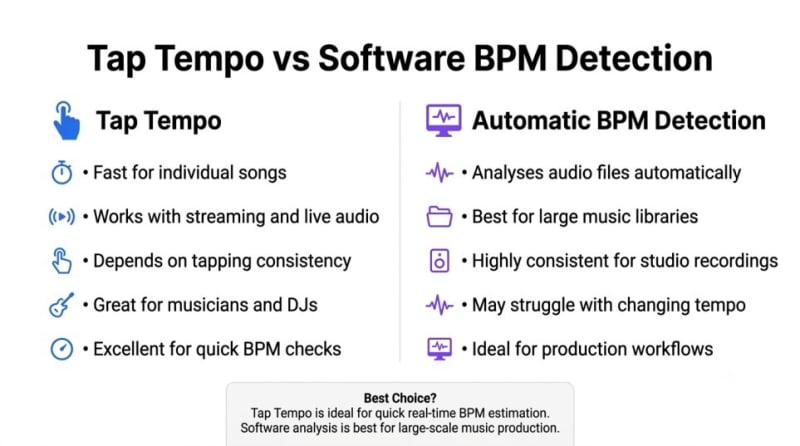
Tap Tempo and automatic BPM detection each have strengths depending on the workflow and music source.
Accuracy Comparison
| Situation | Tap Tempo | Automatic Software |
|---|---|---|
| Single song playback | Excellent | Excellent |
| Live performances | Very Good | Can struggle |
| Large music libraries | Not practical | Excellent |
| Songs with changing tempo | Good with careful tapping | May require manual correction |
| Streaming platforms | Excellent | Usually unavailable |
| Studio production workflow | Good for quick checks | Best choice |
Rather than replacing one another, these methods work best when used together. Many experienced musicians use automatic analysis for efficiency and Tap Tempo as a quick way to verify results whenever something doesn't sound quite right. If you've already measured the tempo manually, our BPM Calculator can help verify the final BPM value. Popular BPM analysis tools include Rekordbox, Serato DJ, Mixed In Key, Ableton Live, Logic Pro, and FL Studio. While each uses different detection algorithms, they all benefit from occasional manual verification when analysing more complex recordings.
Factors That Affect Accuracy
If two people use the same Tap Tempo tool on the same song, they won't always get identical results. That's because manual BPM detection depends on several human and technical factors working together.
Understanding these factors is far more valuable than simply knowing whether Tap Tempo is accurate. Once you recognise what influences the result, improving your consistency becomes much easier.
Number of Taps
One of the most common mistakes is stopping too early. While it's possible to estimate a song's tempo after only a few taps, the result becomes noticeably more reliable as additional taps are recorded. Each consistent tap helps smooth out tiny timing differences that naturally occur because of human reaction time.
For most songs with a steady rhythm, around 8 to 12 taps provide a dependable estimate. Continuing beyond that often produces an even more stable reading, especially if you're verifying the tempo before a performance or recording session. Rather than rushing to see the BPM immediately, allow the reading to settle naturally. A few extra seconds usually produce a more consistent result.
Rhythm Consistency
Consistency has a greater impact on accuracy than speed. Many users focus on tapping quickly instead of tapping evenly. Even small timing differences can slightly increase or decrease the displayed BPM, especially during the first few taps.
A helpful approach is to ignore individual drum hits and follow the song's underlying pulse instead. Once your tapping locks into the rhythm, the BPM reading typically becomes much more stable. This is also why experienced musicians often achieve consistent results more quickly. Years of practising rhythm make it easier to recognise and follow a steady pulse without constantly adjusting their timing.
Device Delay
People sometimes assume device latency makes Tap Tempo inaccurate. In most cases, that's not true. Modern computers, smartphones, and tablets register screen touches and keyboard presses extremely quickly. Any processing delay is usually so small that it has little practical effect on BPM calculations.
The bigger influence is usually the user's reaction time. Human timing naturally varies by small fractions of a second, and those variations contribute far more to minor BPM differences than the device itself. If you notice inconsistent readings, improving your tapping rhythm will almost always have a greater impact than changing devices.
Testing Different Music Genres
Not every genre is equally easy to analyse with Tap Tempo. The structure, rhythm, and production style of a song all influence how easily you can identify its underlying pulse.
Electronic dance music is usually the easiest. Most EDM, house, techno, and trance tracks maintain a steady tempo from beginning to end, making them ideal for manual tapping. Once you've matched the beat, the displayed BPM often remains stable throughout the song.
Pop music also tends to produce reliable results because modern productions are commonly recorded to a click track. Although arrangements may become more energetic during choruses, the underlying tempo usually stays consistent.
Rock music can be slightly different. Bands playing with live drummers often introduce subtle tempo variations that make performances feel more natural. These changes are usually too small for listeners to notice but can occasionally cause minor differences when measuring BPM manually.
Jazz presents another challenge. Swing rhythms, improvisation, and expressive timing require you to follow the main pulse rather than individual notes or fills. New users sometimes tap along with melodic phrases instead of the underlying beat, which leads to inconsistent readings.
Classical music is perhaps the least predictable genre for Tap Tempo. Conductors intentionally speed up and slow down performances to create expression, so there may not be one fixed BPM for the entire piece. In these situations, Tap Tempo is most useful for measuring individual sections rather than the complete performance.
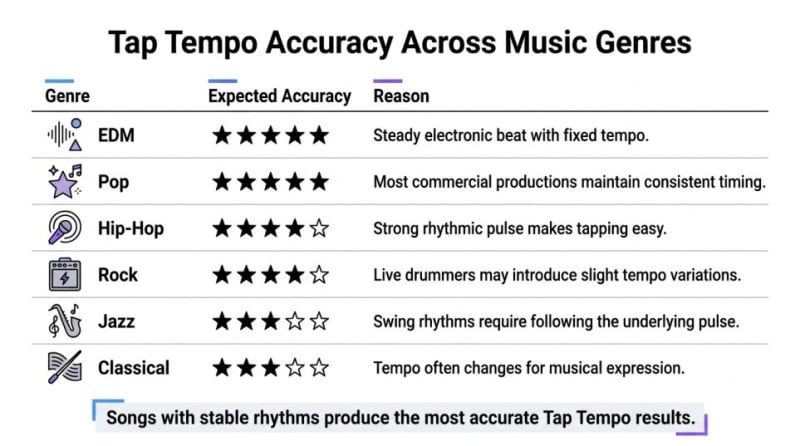
Tap Tempo accuracy varies slightly depending on musical style and rhythmic complexity.
Genre Comparison
| Music Genre | Expected Tap Tempo Accuracy | Notes |
|---|---|---|
| EDM / Dance | Excellent | Stable electronic tempo throughout the track. |
| Pop | Excellent | Most songs maintain a consistent BPM. |
| Hip-Hop | Very Good | Strong rhythmic pulse makes tapping straightforward. |
| Rock | Very Good | Minor tempo variations may occur with live drummers. |
| Jazz | Good | Focus on the main pulse instead of improvisation. |
| Classical | Moderate | Tempo often changes for musical expression. |
These differences don't mean Tap Tempo becomes unreliable for certain genres. They simply highlight that some styles demand more careful listening than others. Recognising the song's primary pulse is usually more important than following every instrument or rhythmic variation. Styles that use swing rhythms, shuffle grooves, or halftime feels may also require extra attention because the strongest beat isn't always the one listeners instinctively follow. Focusing on the underlying pulse rather than individual instruments usually produces more reliable results.
Live Music vs Studio Recordings
Whether a song was recorded in a professional studio or performed live can have a noticeable impact on BPM consistency.
Studio recordings, particularly modern commercial releases, are often created with click tracks that keep every musician synchronised to a fixed tempo. As a result, the BPM remains remarkably stable from start to finish, making these recordings ideal for Tap Tempo.
Live performances are different. Even highly experienced drummers and bands naturally adjust their timing during a performance. A chorus may become slightly faster to increase energy, while an emotional bridge may slow down to create expression. These subtle tempo movements are part of what makes live music feel authentic.
For this reason, it's completely normal to see small BPM variations when tapping along with concert recordings or acoustic performances. The tool isn't becoming less accurate. It's reflecting the natural changes occurring within the music itself. If you're measuring a live performance, choose one section of the song and tap consistently through that passage rather than trying to capture the entire performance with a single reading. This approach produces a more meaningful result and better represents the tempo at that specific moment.
Professional Tips
Small improvements in technique can make a surprisingly large difference to your results. Musicians who use Tap Tempo regularly often follow a few simple habits to maximise consistency.
- Wait until the main groove is clearly established before you begin tapping. Starting too early during an intro can produce unnecessary variation.
- Follow the song's primary pulse instead of individual drum fills, guitar riffs, or vocal phrases.
- Complete at least 8 to 12 consistent taps before judging the displayed BPM.
- If the reading changes significantly, stop and repeat the process instead of trying to correct your rhythm halfway through.
- For important projects, repeat the measurement two or three times and compare the results. If each attempt produces nearly the same BPM, you can be confident in the final value.
These techniques require very little extra time but can noticeably improve consistency, especially when working with unfamiliar songs or complex arrangements. If you're practising your timing rather than measuring it, a digital Metronome can help you develop a steadier sense of rhythm before testing your tapping accuracy.
Common Misconceptions
Despite its popularity, several misconceptions continue to shape how people view Tap Tempo. Understanding the facts can help you use the tool more confidently and interpret the results correctly.
"Tap Tempo is just a rough guess."
Not quite. When you tap consistently to a song with a stable rhythm, Tap Tempo can produce results that are very close to professional BPM analysis software. The tool isn't making a random estimate. It's calculating tempo from the timing of your taps. In many everyday situations, the difference is small enough to have no practical impact.
"Professional musicians never use Tap Tempo."
This is another common myth. Many DJs, producers, music teachers, and performers use Tap Tempo as part of their daily workflow. It provides a quick way to estimate tempo without importing files into specialist software, making it particularly useful during rehearsals, live performances, or casual listening. For larger production projects, professionals may verify the result using dedicated software, but that doesn't reduce the value of Tap Tempo. Instead, both methods serve different purposes.
"More taps always mean better accuracy."
Only to a point. Additional taps help average out small timing variations, but endlessly tapping won't continue improving the result. Once you've established a steady rhythm over several beats, the BPM typically stabilises. Continuing for another minute rarely produces a meaningful difference.
"The tool is wrong if the BPM changes."
Not necessarily. A changing BPM often reflects changes in your tapping consistency or the music itself. Live recordings, orchestral performances, and songs played by human drummers frequently include subtle tempo variations that are part of the performance rather than an error in measurement.
Final Verdict
So, how accurate is Tap Tempo? For most real-world situations, it's surprisingly accurate.
If you're tapping along to a song with a steady beat and maintaining a consistent rhythm, the result is often close enough for rehearsing, practising, DJ preparation, playlist organisation, and many music production tasks. While automatic software remains the preferred option for analysing large collections or highly complex recordings, Tap Tempo delivers an excellent balance of speed, convenience, and reliability.
The most important factor isn't the software. It's your consistency. Waiting for a clear beat, following the song's main pulse, and completing several steady taps will usually produce a dependable BPM estimate. These simple habits make a much bigger difference than changing devices or searching for another tool.
Ultimately, Tap Tempo isn't intended to replace professional audio analysis. It provides a fast, practical, and dependable way to measure tempo whenever you need an answer without interrupting your workflow. If your goal is to identify the BPM of a song quickly and confidently, Tap Tempo remains one of the most effective manual methods available.
Continue Learning
Continue exploring rhythm, tempo, and BPM with these guides:
How to Find the BPM of Any Song
Why Songs Don't Always Have One Fixed BPM
Common Metronome Mistakes That Slow Down Your Progress
Pitch Percentage & BPM: Technics vs. Pioneer Fader Behavior
How Musicians Find Song Tempo by Ear
Ready to Test Your Own Accuracy?
The best way to understand Tap Tempo accuracy is to try it yourself. Open our Tap Tempo tool, measure the same song several times, and compare your results. You'll quickly see how consistent tapping produces stable BPM readings and how small improvements in timing can increase accuracy even further.
Whether you're practising an instrument, preparing a DJ set, producing music, or simply satisfying your curiosity, regular use will help you develop a stronger sense of rhythm while giving you dependable tempo estimates in just a few seconds.
Why You Can Trust This Guide
- Independently researched using trusted music production resources.
- Reviewed under the TheTapTempo Editorial Constitution.
- Written to help musicians, DJs, producers, and learners make informed decisions.
- Updated regularly to reflect current best practices.
This article has been researched, written, and reviewed according to our Editorial Policy.
Frequently Asked Questions
Common questions about finding the BPM of a song.