
How to Match the BPM of a Reference Song Without Guessing
Learn the producer's workflow for finding a reference track's real tempo, matching it accurately, and handling songs that shift or drift in speed.
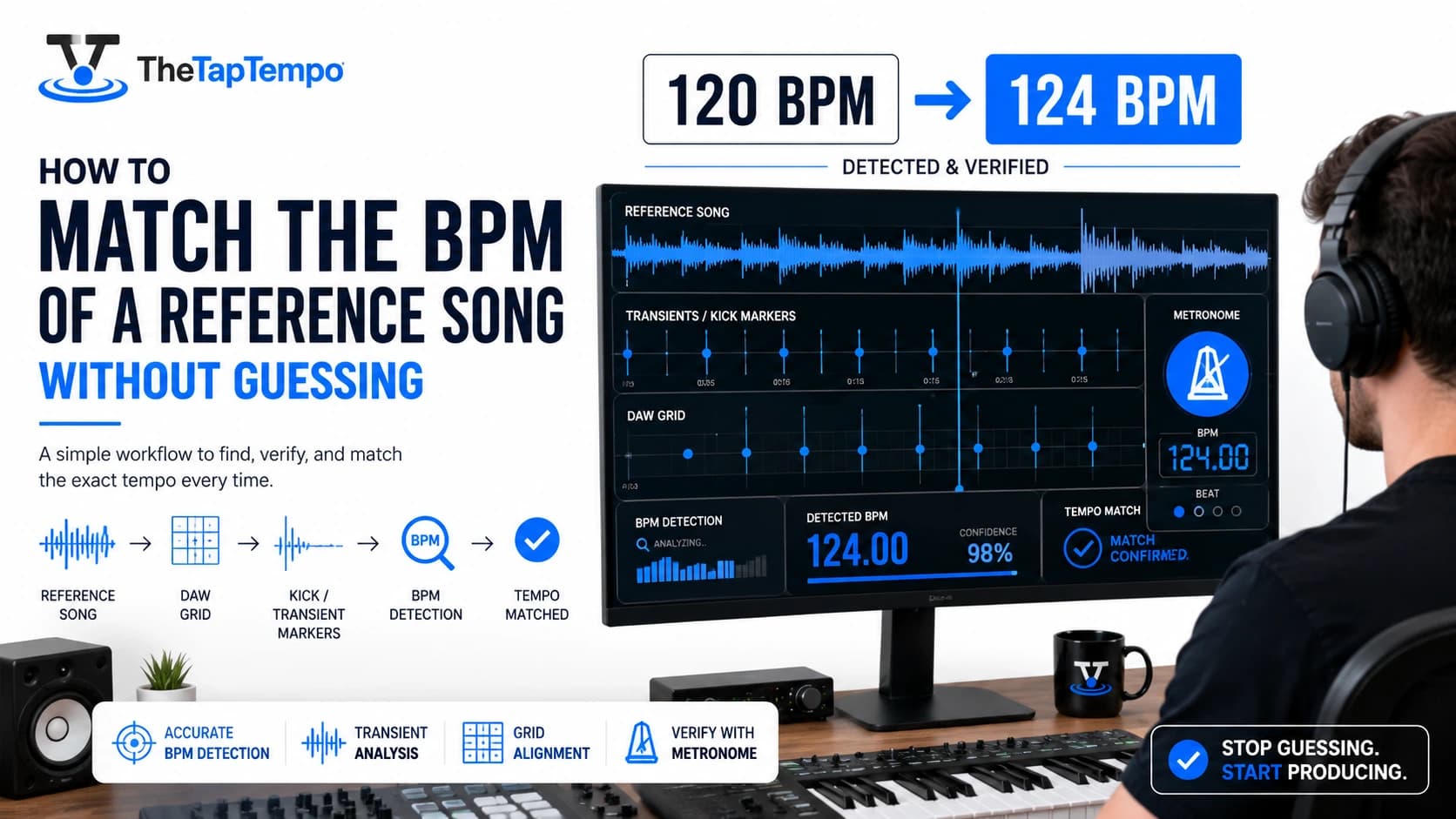
Producers lean on reference tracks constantly, but tempo is usually the first thing that goes wrong. You import a track, the online BPM listing looks off, your grid doesn't line up, and now you're guessing instead of working. Getting the reference tempo right at the start saves hours of frustration later in a session.
This guide walks through a complete reference track workflow: identifying the real tempo, matching it without producing a carbon copy, and handling songs that don't sit on a single fixed BPM. It assumes you already have a reference track in hand and want to use its tempo correctly, not decide what tempo your own song should be from scratch.
Why Producers Use Reference Tracks
A reference track is more than a mixing benchmark. It's a rhythmic anchor that shapes how dense your arrangement feels, how your transitions land, and how your groove sits against the tempo you choose.
Reference Tracks as Rhythmic Anchors
Most producers reach for reference tracks to check levels, tone, and mix balance, but tempo plays an equally important role that's easy to overlook. A reference track's BPM influences arrangement pacing directly: how many bars a section can breathe before it needs to change, how busy a hi-hat pattern can get before it feels cluttered, and how much space a transition has to build energy. Matching that tempo accurately means your arrangement decisions are being tested against the same rhythmic foundation the reference track was built on.
This matters most in remix work and cover production, where the goal is usually to preserve a track's rhythmic identity while changing everything else around it. Get the tempo wrong, even by a few BPM, and stems that should lock together start to drift.
What a Reference Track Actually Is
A reference track is simply an existing piece of audio, whether a full commercial release, an isolated stem, a live recording, or an unreleased demo, that you use as a benchmark while building your own project. It doesn't need to be perfect or officially tagged with metadata. What matters is that you can extract a reliable tempo from it before building decisions on top of that number.
Quick Answer: Reference tracks matter for tempo, not just tone and levels. The BPM you extract from a reference shapes arrangement density, transition pacing, and groove feel, which is why getting that number right matters before you build anything on top of it.
The Right Way to Identify a Song's BPM
Finding a reference track's real tempo means treating any single source, whether a streaming app's listed BPM or an automated detection tool, as a starting point to verify rather than a final answer.
Checking Published Metadata First
Streaming platforms and BPM databases are a reasonable first stop, since they're fast and require no setup. The problem is that these listings are frequently crowd-sourced or auto-generated, and they're wrong often enough that trusting them blindly causes real problems. A track can be listed a few BPM off due to rounding, or occasionally off by a much larger margin due to a database error.
Treat any published BPM as a hypothesis to confirm, not a fact to build a session on. The next two steps exist specifically to catch the cases where the listed number is wrong.
Verifying With Transient Inspection in Your DAW
The most reliable way to confirm a tempo is to look directly at the audio. Import the reference track, zoom into the waveform, and check where the strongest transients, typically kick drum hits, land relative to your grid. Checking this at multiple points in the song, for example around bar 1, bar 9, and bar 33, reveals whether the track holds a single tempo throughout or drifts as it progresses.
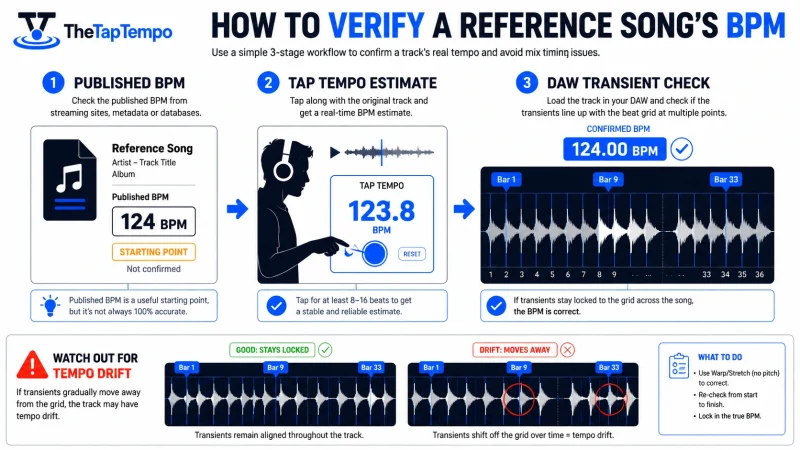
If the transients line up cleanly with your grid at the tempo you've set, you've confirmed the BPM directly from the audio rather than trusting a label. If they drift out of alignment further into the song, that's your first signal you may be dealing with a tempo-changing track, which the next section of this guide covers in detail.
Quick Answer: Don't trust a single published BPM number. Confirm it by checking where kick drum transients land against your grid at several points in the song, not just at the very beginning.
When There's No Published Tempo
Vinyl rips, live bootlegs, unreleased demos, and obscure tracks often have no listed BPM anywhere. In these cases, manually tapping along to the track with Tap Tempo gives you a fast, reliable starting estimate that you can then confirm with the transient check described above.
This combination, a manual tap-based estimate followed by visual confirmation in your DAW, tends to be more reliable than either method used alone, especially on audio with unclear or damaged transients.
The Half-Time and Double-Time Trap
A common source of confusion happens when an automated tool or database lists a tempo that's exactly half or double what the track actually feels like. A track that feels like a driving 150 BPM might be listed as 75 BPM, because the detection method locked onto a slower underlying pulse instead of the felt beat.
Neither number is technically wrong, since both describe a real pulse in the track, but only one of them will feel correct once you're building an arrangement around it. If a listed BPM feels dramatically slower or faster than the track's actual energy, check whether doubling or halving it matches what you're hearing before locking in your session tempo.
Quick Answer: If a track's listed BPM feels wrong for its energy, check whether it's exactly double or half of what you'd expect. Automated tools frequently lock onto the wrong pulse layer rather than the one that actually feels like the beat.
Matching Tempo Without Copying the Original Song
Matching a reference track's tempo doesn't mean reproducing its rhythm. You can borrow the macro-tempo, the overall BPM, while building an entirely different groove on top of it.
Borrowing Macro-Tempo, Not Micro-Rhythm
Think of tempo and groove as two separate layers. The tempo is the overall speed, a single number like 124 BPM. The groove is everything happening underneath that number: whether subdivisions are straight or swung, how far off the grid certain hits sit, and how dense the rhythmic pattern feels. Two tracks can share an identical BPM and sound completely different because their grooves diverge.
This distinction is what allows you to use a reference track's tempo as a starting point without producing something that sounds like an imitation. The number matches. The feel doesn't have to.
Adjusting Groove and Swing to Keep Your Identity
Once your session tempo matches the reference, the creative work is in how you diverge from there. Adjusting swing percentage on your drum programming, shifting from straight sixteenth notes to a triplet-based feel, or changing which subdivisions carry the strongest emphasis all preserve the reference tempo while building something rhythmically distinct.
For example, a 124 BPM house reference and a 124 BPM organic house track can share an identical tempo while feeling completely different, because one leans on tight, quantized sixteenths and the other uses loose, human-feeling triplet swing. The shared number is a foundation, not a constraint on creative identity.
Quick Answer: Matching tempo means matching the BPM number, not the rhythm on top of it. Adjusting swing, subdivision feel, and micro-timing on your own tracks lets you build something distinct while still sitting at the same tempo as your reference.
How to Handle Songs That Change Tempo
Not every reference track holds one tempo from start to finish. Recognizing whether a track drifts gradually or jumps between fixed tempos changes how you should set up your session.
Linear Tempo Drift vs. Section-Based Changes
Two different patterns tend to show up in tempo-changing references, and they call for different handling. Linear drift happens gradually, common in live-tracked or acoustic recordings, where the tempo creeps up slightly through a chorus or pulls back during a quiet section without ever landing on a clean, fixed number. Section-based changes are abrupt instead, where a track deliberately jumps from one fixed tempo to another, often between a verse and a chorus, as a clear compositional choice.
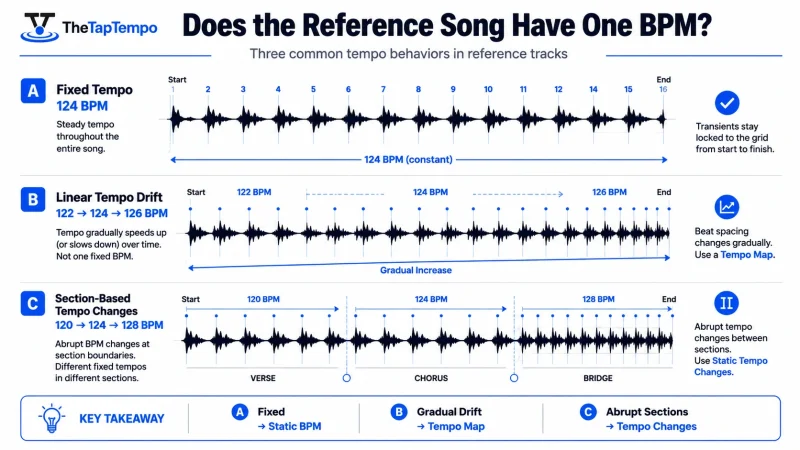
Identifying which pattern you're dealing with usually just takes checking your transient alignment at several points across the song, the same method described earlier for verifying tempo in general.
Deciding Between a Tempo Map and a Static Lock
If a reference track drifts gradually, building a tempo map, meaning programming multiple tempo changes into your session that follow the reference's actual drift, will keep your grid aligned throughout the whole track. If a track uses clear section-based jumps instead, a series of static tempo changes at the exact section boundaries is usually cleaner than trying to smooth them into a continuous map.
For reference purposes only, rather than full production alignment, warping the reference track to a single fixed tempo and accepting some drift in exchange for simplicity is sometimes the more practical choice, especially early in a project when you're still deciding on arrangement direction.
Quick Answer: Gradual tempo drift usually calls for a tempo map that follows the reference continuously. Abrupt, section-based tempo changes are usually cleaner to handle as a series of static tempo jumps at each section boundary.
Testing the Feel With a Metronome
Once you've identified whether a reference track drifts or jumps, it can help to play or program against a steady click at the tempo you've chosen for a given section, using a metronome, to confirm the tempo actually feels right before committing your full session to it.
This step is especially useful when you're adapting a live, drifting reference into a more fixed digital session, since it lets you catch a tempo choice that technically matches the reference but doesn't feel right once it's isolated from the original recording.
Mistakes to Avoid When Using Reference Tracks
Most reference track problems come from either trusting bad source material or forcing too much precision onto material that was never meant to be perfectly rigid.
Technical Mistakes
Low-quality, rate-converted audio files are a common source of subtle timing problems. A track that's been converted between formats or sample rates incorrectly can introduce tiny timing artifacts that throw off transient detection even when the tempo itself is fine. Trusting a database BPM without ever confirming it against the actual audio is another frequent mistake, one that compounds quickly once other tracks in a session get built around a number that was wrong from the start.
Forcing a reference track onto a hard, unwavering grid lock can also cause problems, particularly with live or organic recordings. Stripping out every trace of natural tempo movement in the name of precision can make a reference feel stiff and unrepresentative of how the original track actually plays.
Creative Mistakes
On the creative side, the most common mistake is treating tempo matching as a license to copy everything else about a track too. Matching a reference's BPM and then also matching its exact drum pattern, chord rhythm, and arrangement structure crosses from "inspired by tempo and energy" into a near-duplicate, which creates both an artistic and a practical problem.
Ignoring your own rhythmic identity in favor of exactly reproducing a reference is a common trap, especially for newer producers who assume matching everything about a hit song is the safest path to a hit of their own. The tempo is meant to be a starting foundation, not a template for every other decision in the track.
Quick Answer: Most reference track mistakes come from trusting unverified tempo data or converted audio without checking it, and from copying a reference's full rhythm and arrangement instead of just its tempo. Matching the number is the goal, not matching everything else about the track.
A Practical Reference Track Workflow
Bringing everything together, here's a repeatable sequence for using a reference track's tempo accurately from the start of a session.
Confirm the Reference Tempo
Start with any published BPM as a hypothesis, then confirm it by checking transient alignment at multiple points in the track. If no published tempo exists, tap it manually first, then verify the same way.
Decide Fixed or Mapped Grid
Determine whether the reference holds a single tempo, drifts gradually, or jumps between section-based tempos, and choose a tempo map, a static lock, or a series of section changes accordingly.
Compare Against Your Project
Once you have a confirmed tempo, compare it against your own project's tempo using the BPM Calculator to check the mathematical relationship between the two, particularly useful if you're intentionally working at a related but different tempo rather than an exact match.
Adapt the Groove, Not Just the Number
With the tempo confirmed and compared, shift your focus to swing, subdivision feel, and rhythmic emphasis so your project shares the reference's tempo without sharing its exact identity.
Quick Answer: Confirm the tempo through transient checks, decide whether it needs a map or a fixed lock, compare it against your own project, then build your groove on top of the confirmed number rather than copying the reference's rhythm directly.
Continue Learning
Explore more guides on tempo, energy, and music production:
- How to Choose the Right BPM Before Recording
- Why Small BPM Changes Can Completely Change a Song
- How DJs Calculate the Perfect BPM Before Mixing Songs
- How to Find the BPM of Any Song
Found the tempo of your reference track? Use our BPM Calculator to compare, verify, and plan your project with confidence. And if you'd like to understand the musical character behind the tempo you've matched, our Tempo Markings guide breaks down what different speed ranges traditionally represent.
This article has been researched, written, and reviewed according to our Editorial Policy.
Frequently Asked Questions
Common questions about finding the BPM of a song.