
Master Tempo vs Key Lock: Serato & Rekordbox Guide
Learn what Master Tempo and Key Lock really do, why they can cause audio artifacts, how pitch shifts affect the Camelot Wheel, and when to turn Key Lock off.
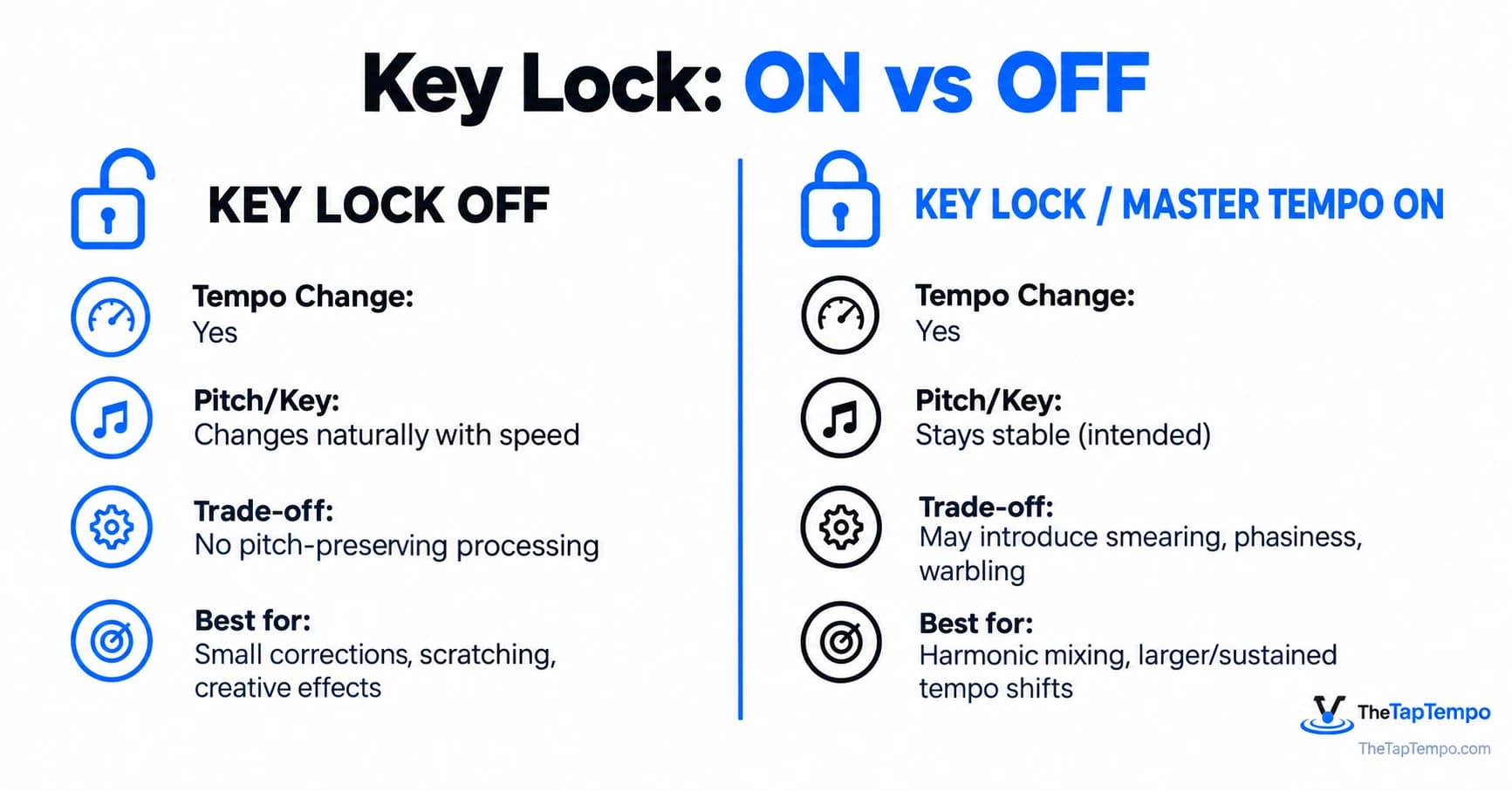
Master Tempo vs Key Lock: Harmonic Mixing Guide for Serato & Rekordbox
Every DJ who has nudged a pitch fader has run into the same fork in the road: leave Key Lock on and keep the track's key stable, or leave it off and let pitch move naturally with tempo. The two choices sound simple, but they trigger very different digital signal processing behind the scenes, and that processing has real consequences for harmonic mixing and sound quality.
This guide explains what Master Tempo and Key Lock actually do, why they sometimes make a track sound phasey or robotic, how pitch changes interact with the Camelot Wheel, and when disabling Key Lock is the smarter call.
| Setting | Tempo change | Pitch / key | Main processing trade-off | Typical use |
|---|---|---|---|---|
| Key Lock off | Yes | Changes naturally with playback speed | Avoids dedicated pitch-preserving time-stretching | Small corrections, scratching, creative pitch effects |
| Key Lock / Master Tempo on | Yes | Intended to remain stable | May introduce smearing, phasiness, or warbling | Harmonic mixing and larger or sustained tempo changes |
What Happens to Musical Key When You Move the Pitch Fader?
With Key Lock off, the software keeps the natural relationship between playback speed and pitch: changing the speed changes the frequency content by the same ratio. This avoids the dedicated pitch-preserving time-stretching process, although other playback or output processing may still be present. Push the tempo up and the track gets faster and higher-pitched; pull it down and the track gets slower and lower.
Moving the pitch fader without Key Lock engaged changes playback speed and frequency by the same ratio. The perceived musical shift is measured logarithmically in semitones rather than as a simple percentage:
semitone shift = 12 × log₂(new playback rate ÷ original playback rate)
A widely used rule of thumb among digital DJs is that roughly a 6% tempo increase is close to one semitone of pitch rise. That's a useful mental shortcut for anticipating how far a track has drifted from its analyzed key, but it's an approximation, not an exact figure baked into any specific DJ platform. If you'd rather skip the mental math entirely, our Pitch Tempo Calculator converts any pitch percentage into the resulting BPM and semitone shift instantly.
Quick answer: With Key Lock off, tempo and pitch move together, just like a record player. A track sped up 6% will sound roughly a semitone higher, which is enough to shift it away from its labeled Camelot key during a harmonic mix.
This is precisely the problem Key Lock and Master Tempo were built to solve. Solving it, however, introduces a different set of trade-offs, which is the core of this guide.
Confirming the Target Tempo Before You Shift
Before dialing in a pitch adjustment, it helps to know exactly what BPM you're aiming for rather than eyeballing it against the other deck. Running both tracks through our BPM Calculator first turns the pitch fader move into a deliberate, calculated adjustment instead of a guess, which matters more the larger the shift becomes.
Master Tempo & Key Lock Explained: How DJ Software Keeps Pitch Fixed
Master Tempo and Key Lock are two names, used by different manufacturers, for the same underlying goal: changing playback tempo while attempting to preserve the track's original pitch and musical key. Serato calls this feature Key Lock; rekordbox and AlphaTheta hardware generally use the term Master Tempo. Functionally, both are trying to decouple speed from pitch, but the exact DSP engine behind each implementation isn't guaranteed to be identical across software versions or hardware models.
According to Serato's official mixing documentation, enabling Key Lock keeps a song's key from changing as tempo is adjusted. AlphaTheta's rekordbox documentation describes Master Tempo the same way functionally: changing playback speed without changing pitch. Neither source claims the pitch is preserved with zero side effects. AlphaTheta's own support documentation goes further, explaining that Master Tempo and Key Lock can change sound quality because key-control processing is used to keep the key constant, and it describes this as an expected part of the feature's specification rather than necessarily a malfunction.
That distinction is worth sitting with, because it's the detail most DJ tutorials skip past: preserving the musical key is not the same thing as preserving the original waveform. The software is not merely changing the playback rate; it is applying pitch-preserving time and frequency processing so timing can change without the intended tonal center moving by the same amount. That processing step is where the trade-offs of the next section come from.
Key Lock vs Key Shift vs Pitch Play
It's worth separating Key Lock from two features it's frequently confused with:
- Key Shift intentionally transposes a track's key, rather than preserving it. Serato's documentation notes that Key Shift and Key Sync require Pitch 'n Time DJ and are built for deliberate transposition, not tempo-change protection.
- Pitch Play is a performance feature that triggers cue points or other assigned material at different pitch relationships. Its exact behavior and available controls depend on the DJ software and hardware.
Key Lock preserves. Key Shift changes on purpose. Confusing the two is one of the most common misunderstandings in DJ forums and tutorials.
The Hidden Cost of Key Lock: Audio Artifacts & Transient Smearing
Key Lock keeps a track's nominal pitch stable, but the pitch-preserving time and frequency processing used by the particular software or hardware can introduce audible artifacts. How noticeable those artifacts are depends on the size of the tempo shift, the algorithm in use, and the musical material itself. Dense arrangements may mask some artifacts more effectively than exposed vocals, sustained pads, or open hi-hats, though this is a general tendency rather than a fixed psychoacoustic rule.
Common Artifacts and What They Sound Like
Research on time-scale modification identifies transient smearing and phasiness as characteristic artifacts of phase-vocoder-style, pitch-preserving time-stretching, with a related category, warbling or unstable timbre, showing up most often on vocals and sustained tones.
| Artifact | What it sounds like | Often noticeable on |
|---|---|---|
| Transient smearing | Softer, less defined attacks | Kicks, snares, claps |
| Phasiness | Hollow, watery, or reverb-like tone | Pads, sustained synths, stereo material |
| Warbling | Unstable pitch or timbral flutter | Vocals and exposed melodies |
| Metallic or robotic tone | Synthetic or processed character | Vocals under substantial processing |
| Loss of presence | Less immediate or focused sound | Exposed full mixes at larger shifts |
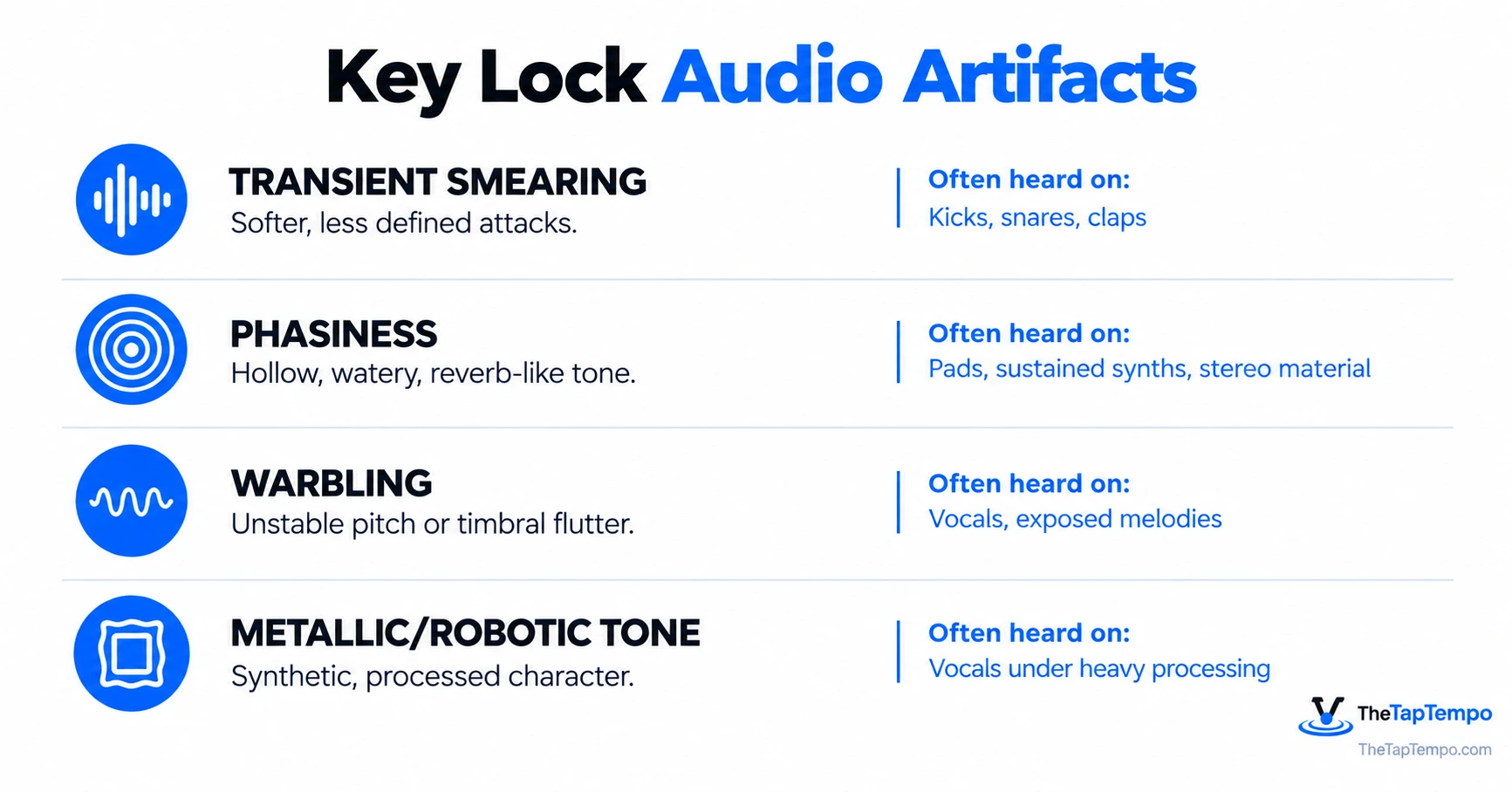
Quick answer: Key Lock artifacts aren't random. They cluster around transient smearing (weaker drum hits), phasiness (hollow, reverb-like coloration), and vocal warbling. As the time-stretching demand increases, artifacts generally become more likely or more audible, although the result depends heavily on the algorithm and source material.
None of this means Key Lock is unusable. It means the cost of pitch preservation scales with how hard you push it. A small tempo correction may produce a pitch change that is less noticeable in a short transition, but whether it actually matters depends on the material, monitoring level, and harmonic context, not on a fixed percentage.
Ruling Out Non-Key-Lock Problems
Not every robotic or distorted sound during a tempo-shifted mix comes from Key Lock. Clipping from excessive gain, a low-quality source file, an incorrect beatgrid, CPU strain, or an unrelated effect can all produce similarly unpleasant results. AlphaTheta's own troubleshooting documentation lists disabling Master Tempo as one diagnostic step for distortion, treated as a test rather than confirmation that Master Tempo is always the culprit. Before blaming Key Lock, it's worth checking gain staging and file quality first.
Camelot Wheel Rules: Shifting Keys via Pitch Adjustments
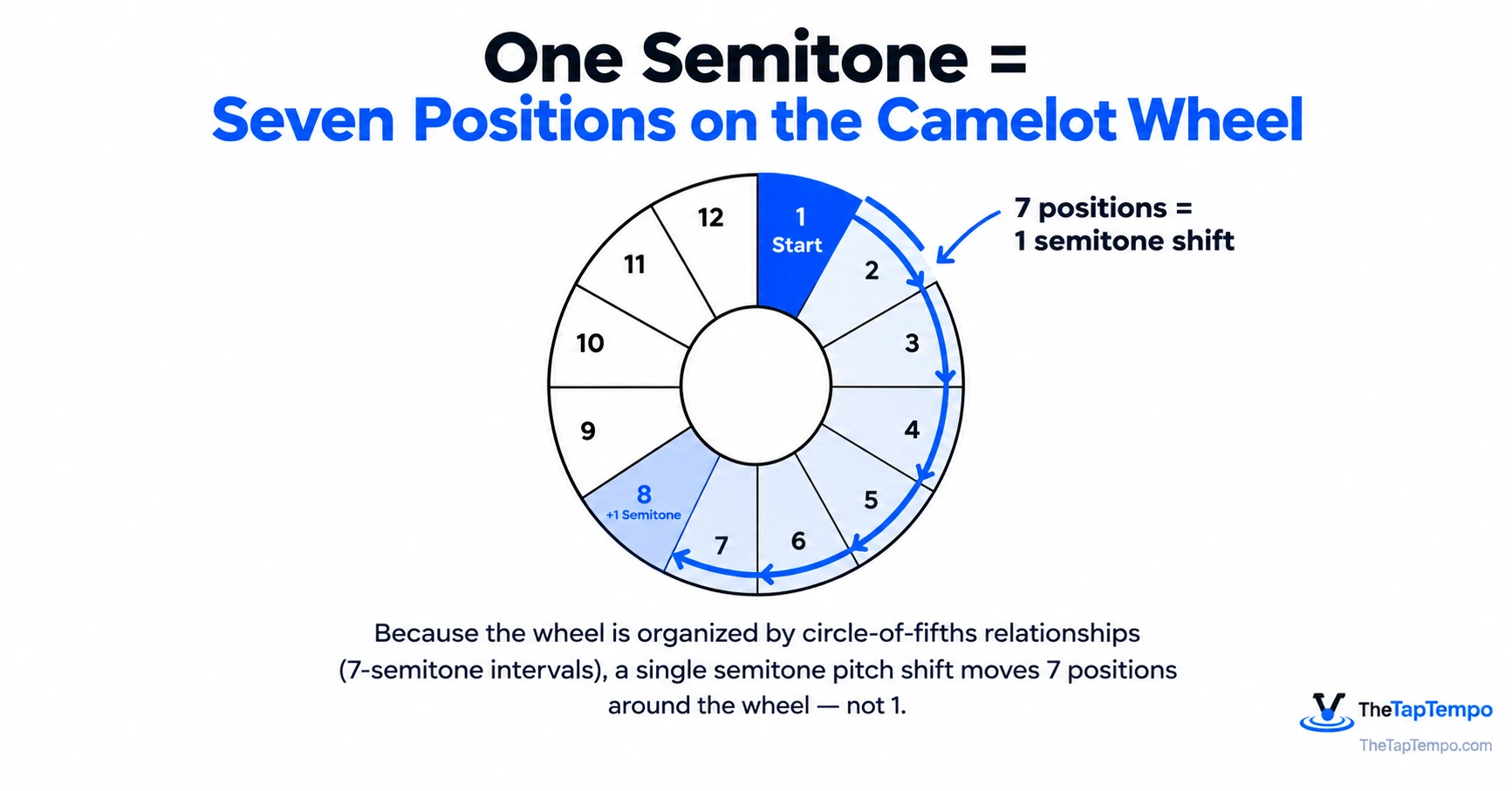
Pitch changes and Camelot Wheel movement are not measured the same way, so a one-semitone pitch shift does not move a track by one Camelot number. The Camelot Wheel is organized by circle-of-fifths relationships rather than chromatic semitone steps, which means the musical distance implied by a semitone shift and the distance implied by a Camelot-number shift are calculated differently.
What a Semitone Shift Means on the Wheel
Music theory describes the circle of fifths as built from perfect-fifth intervals of seven semitones, which is why Camelot numbering does not track one-to-one with chromatic transposition. Under the standard wheel orientation, a one-semitone upward transposition moves seven positions in one direction around the same letter ring, while a one-semitone downward transposition moves seven positions in the opposite direction. Because visual numbering conventions can vary between charts and software, treat this as a directional relationship to verify against your own chart rather than a number to memorize as a fixed clockwise rule.
This matters directly for harmonic mixing. With Key Lock off, the track's sounding pitch may no longer correspond to the original analyzed key, even though the software continues to display the original library label. With Key Lock on, the software works to keep the analyzed key stable even as tempo changes, which is why many DJs choose Key Lock during harmonic transitions, while still treating it as a context-dependent setting rather than an always-on default.
Why the Camelot Label Isn't Infallible
A few caveats worth keeping in mind so the Camelot label doesn't get treated as absolute:
- Key analysis can be wrong. Automated key detection is a best estimate, not a guarantee, particularly on tracks with ambiguous tonal centers.
- Tracks can modulate. A song that changes key partway through will only ever have one label attached to it.
- A shared Camelot number doesn't guarantee a clean blend. Bass content, vocal register, and arrangement can clash even when two tracks are technically compatible on the wheel.
- Key Lock reduces key drift, but it doesn't eliminate mixing judgment. It helps preserve the track's pitch relationship while tempo changes; it does not correct inaccurate key detection and it does not replace listening.
None of this is a reason to distrust harmonic mixing as a workflow. It's a reason to treat the Camelot label as a strong starting point that still benefits from your ears confirming the blend, especially after a meaningful tempo adjustment.
When You Should Turn Key Lock OFF
Key Lock isn't a setting to leave permanently on by default. It's a tool suited to specific situations, and there are just as many scenarios where natural speed-linked pitch movement is the better-sounding choice. The decision comes down to weighing harmonic stability against audio fidelity for the specific transition you're building.
When It's Worth Keeping On
Key Lock tends to earn its keep when:
- You're making a large tempo adjustment to blend two tracks with very different natural BPMs.
- The transition is long, so any key drift would become obvious over time.
- Vocals or tonal elements from both tracks are overlapping and harmonic clash would be very noticeable.
- You're building a harmonic mix where the Camelot relationship is central to the transition.
When It's Worth Turning Off
Key Lock is often worth turning off when:
- The tempo correction is small, since a shorter transition gives any resulting pitch change less time to become noticeable.
- The transition is short, so any pitch drift resolves before it's noticeable.
- You're scratching. Serato documentation describes automatic Key Lock behavior during scratching so that time-stretched processing does not degrade the scratch response, though the exact behavior can depend on the Serato version, hardware, and selected playback mode.
- You're intentionally using a speed-linked pitch rise or fall as a creative effect, rather than trying to hide it.
- The processed version is audibly worse than the natural pitch shift for that particular track, which only listening can tell you.
Quick answer: Turn Key Lock off for small, short, or scratch-heavy tempo changes where natural speed-linked pitch movement is barely noticeable. Keep it on for large or sustained tempo shifts where harmonic stability matters more than the processing trade-off.
A Practical A/B Listening Workflow
Because artifact severity depends on the algorithm, the source material, and the size of the shift, the most reliable practical way to decide is to listen, rather than apply a fixed percentage rule.
- Loop an exposed section of the track: a vocal phrase, an open kick pattern, or a sustained synth line works best.
- Play the loop with Key Lock on at your intended tempo, and note what you hear.
- Switch Key Lock off at the same tempo and compare directly.
- Listen on your actual monitoring setup, not just headphones, since artifacts that are subtle on headphones can become obvious on a full-range system.
- Test the comparison during the real transition, not only in isolation, since artifacts can be masked or exposed differently once both tracks are playing together.
- Choose whichever mode sounds cleaner for that specific section; the better answer can change from track to track.
Listening on a Bigger System
On a well-tuned club or festival system, artifacts that were subtle in headphones may become more apparent. Exposed vocals, sustained synths, stereo material, and transient-heavy drums can each reveal different problems depending on the system, room, playback level, and processing.
Once you've decided how far you're willing to push the pitch fader, you still need to know exactly how that adjustment translates to BPM. That's a job for a dedicated tool rather than mental math mid-set. Use our Pitch Tempo Calculator to see the exact tempo result of any pitch percentage before you commit to it in your set.
Continue Learning
- How Pitch Percentage Affects BPM
- Why BPM Results Differ
- What Are Milliseconds in Music?
- Why Music Is Divided Into Bars
Shifting pitch without Key Lock? Calculate how your tempo and pitch fader adjustments impact track speed using our Pitch Tempo Calculator.
This article has been researched, written, and reviewed according to our Editorial Policy.
Frequently Asked Questions
Common questions about finding the BPM of a song.