
Why Do You Get Different BPM Results for the Same Song?
Tapped the same song twice and got two different BPM numbers? Here's why human timing, beat choice, and device delay change your results, and how to fix it.
Quick Answer
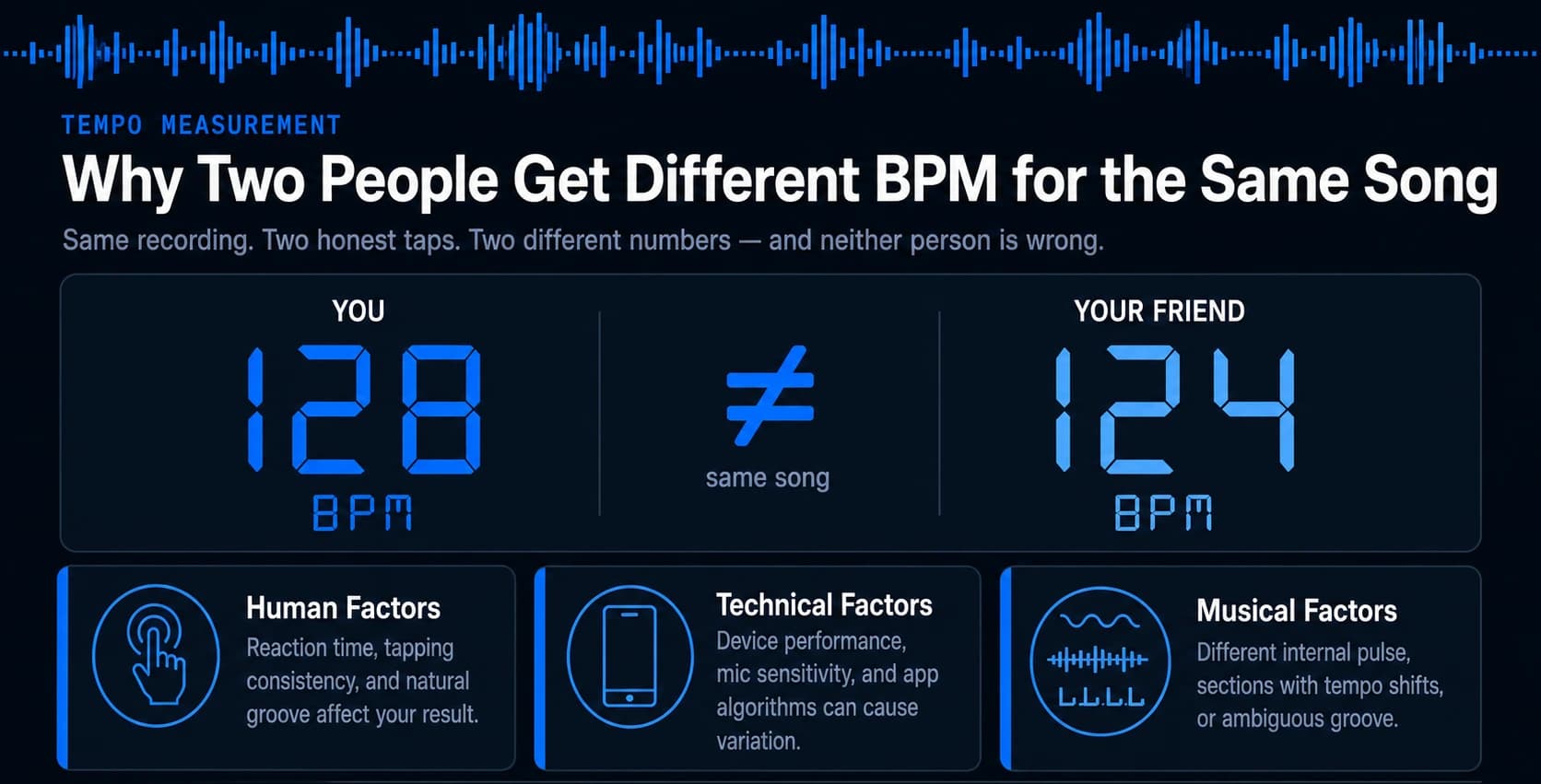
Different BPM results usually come from a mix of human tapping variability, which beat or subdivision you're following, and small delays introduced by your phone or app, not from the song having no real tempo.
You tap along to a track, get 128 BPM. Your friend taps the same song and gets 124. Neither of you did anything obviously wrong, yet the numbers don't match. This kind of mismatch is one of the most common frustrations musicians, DJs, and producers run into when measuring tempo by ear and hand, and it happens for reasons that have nothing to do with the tool being broken.
Different BPM readings usually come down to three overlapping causes: how humans physically tap, what part of the beat each person is following, and small technical delays introduced by the device itself. Once you understand which of these is affecting your result, getting a consistent, trustworthy BPM becomes a lot easier.
Why BPM Results Differ
Two people can tap the same song and land on two different, equally defensible BPM numbers because a tempo reading is built from human timing, not just the music itself. Every tap you make carries a small amount of natural variation, and that variation compounds across a sequence of taps into a final average. On top of that, tempo detection depends on which beat you're actually tracking, and a song often contains more than one plausible pulse to follow.
Think of a BPM reading as a snapshot of a decision, not just a measurement. You decided which sound to tap along to - the kick drum, the snare, a hi-hat pattern, or the overall "feel" of the groove - and that decision shapes the number that comes out. Your friend may have made a different, equally reasonable decision. Add in normal human reaction time and a touch of device latency, and two honest attempts at the same song can land several BPM apart without either person doing anything wrong.
Human Factors
Human timing is the single biggest source of BPM inconsistency, because no two taps from the same person land at the same millisecond, let alone two taps from two different people. Reaction time naturally drifts by a small amount with every tap, and that drift is enough to shift the interval your tool is measuring.
Reaction Time and Tap-to-Tap Variability
Reaction time between taps commonly varies by roughly 20 to 50 milliseconds from one tap to the next, even for someone with strong rhythmic training. That might sound negligible, but at typical song tempos, a variation of just a few dozen milliseconds per tap interval is enough to swing a single-interval reading by several BPM.
This is why tapping only two or three times rarely produces a stable number. You're capturing a small, noisy sample of your hand's timing rather than a settled average of it.
For example, three taps landing at intervals of exactly 500 milliseconds apart would imply a perfectly steady 120 BPM. In practice, those intervals waver slightly from tap to tap, and a tool like Tap Tempo is designed to average that wavering out rather than lock onto a single interval, which is part of why longer tap sequences settle into more trustworthy numbers.
Why Averaging More Taps Helps
Tap tempo tools generally become accurate to within about 1 to 3 BPM once they're given a reasonable number of taps to work with. Using around eight taps is a commonly recommended threshold for smoothing out natural human noise.
A short burst of two or three taps captures a single moment of your hand's timing. A longer, steady sequence captures the actual tempo underneath that noise.
Does Musical Experience Change Accuracy?
Musical experience plays a role here too, though it isn't the whole story. Research on tempo reproduction has found that musicians with more training tend to reproduce a tempo more precisely than those without.
That same research also found that people in general reproduce tempo most accurately around the 120 BPM range, with accuracy dropping off somewhat at much faster or much slower tempos. An experienced drummer and a casual listener can genuinely differ in how tightly they land on a tempo, and a very fast or very slow track is inherently harder for anyone to tap consistently, regardless of skill.
Technical Factors
Beyond human timing, the device and software you're using can introduce a small delay between the moment you tap and the moment that tap is actually registered. This delay is a separate, purely technical source of mismatched BPM results.
Input Latency and Touchscreen Delay
A touchscreen doesn't register a tap instantly. There's a short chain of processing between your finger touching the glass and the app logging that event, and this delay is often called input latency.
That chain differs slightly between phone models, browsers, and even between a phone screen and a laptop trackpad. If you and a friend are tapping on different devices, part of the gap between your two BPM results may simply be each device's own latency signature, not a difference in your timing or musicality.
Why Switching Devices Changes Your Result
This is also why the same person can get a slightly different reading from the same song on two different days if they switch devices, headphones, or apps in between. The tempo of the song hasn't changed. The chain between your finger and the measurement has.
If you want a deeper look at how much natural variation to expect from tap-based measurement itself, our guide on how accurate tap tempo really is breaks down typical margins of error in more detail.
Musical Factors
Sometimes the disagreement isn't about timing accuracy at all. It's about which part of the music each person is tapping to, because most songs contain more than one rhythmic layer that could reasonably be called "the beat."
Beat vs. Subdivision: Tapping a Different Layer
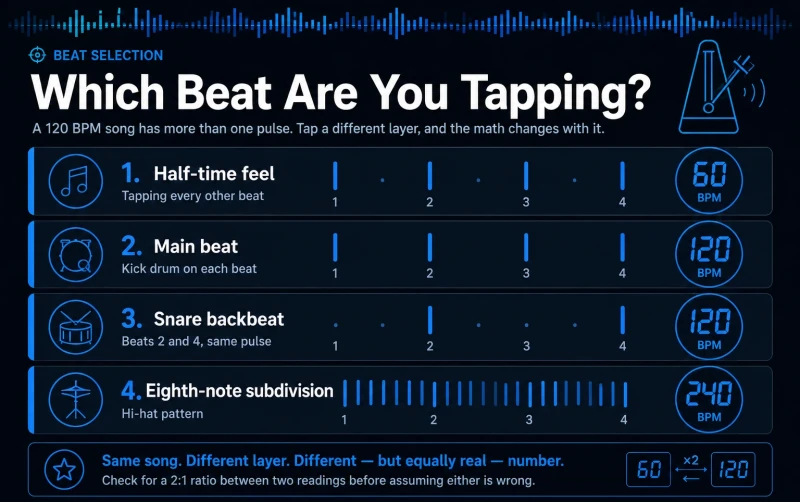
A kick drum, a snare hit, and a hi-hat subdivision can all sit at mathematically related but different tempos relative to each other. Tapping any one of them produces a technically correct but different BPM.
Consider a song with a steady four-on-the-floor kick and a snare that lands on beats two and four. Someone tapping the kick and someone tapping the snare are following the same underlying pulse, so they should land close together. But someone who unconsciously taps a subdivision, like every eighth note instead of every beat, will produce a reading roughly double the actual tempo, while someone tapping every other beat will land at roughly half.
| Pulse Followed | Example in a 120 BPM Song | Resulting Reading |
|---|---|---|
| Main beat (quarter note) | Kick drum on each beat | ~120 BPM |
| Half-time feel | Tapping every other beat | ~60 BPM |
| Eighth-note subdivision | Hi-hat pattern | ~240 BPM |
| Snare backbeat (2 and 4) | Same as main beat | ~120 BPM |
Neither person in this scenario is wrong about what they heard. They've simply locked onto a different layer of the same rhythm.
Syncopation, Swing, and Accents
Syncopation, swing, and heavy accenting can make beat selection harder, because they pull your ear toward an off-beat sound instead of the underlying pulse. A funk or hip-hop groove with a strong syncopated snare can genuinely trick your hand into tapping ahead of or behind the actual beat, even if your instincts feel confident in the moment.
Double-Time and Half-Time Confusion
Beat selection gets especially tricky in genres where the "felt" pulse and the "counted" pulse don't match. Electronic dance tracks are often programmed at tempos like 174 BPM, but many listeners naturally nod their head at half that rate, closer to 87, because the slower pulse is what feels like the groove even though the producer built the track around the faster count.
Ballads and slow hip-hop create the opposite confusion. A track that feels like a relaxed 70 BPM to one tapper might actually be built around a busier 140 BPM pulse that only becomes obvious once you notice the hi-hats or snare rolls filling in the space between the beats you were tapping. Neither number is a mistake in isolation, but they describe two different ways of counting the same rhythm, and that's exactly why two people can each be confident in a result that's roughly double or half the other person's.
If a mismatch between two readings looks suspiciously close to a 2:1 ratio, that's a strong sign the disagreement is a double-time or half-time issue rather than a measurement error. Recognizing that pattern is often faster than trying to retap more carefully.
Live Performances vs. Studio Recordings
A band performing live rarely holds a perfectly fixed tempo the way a click-tracked studio recording does. Tempo can drift slightly across a verse, push forward during a chorus, or pull back during a quiet section, all as part of natural human performance.
Two people tapping different sections of the same live recording can end up with genuinely different, and both genuinely accurate, BPM readings for those specific moments. Our article on why songs don't have one single fixed BPM covers this in more depth if you want to understand tempo drift across a full performance.
How to Improve Accuracy
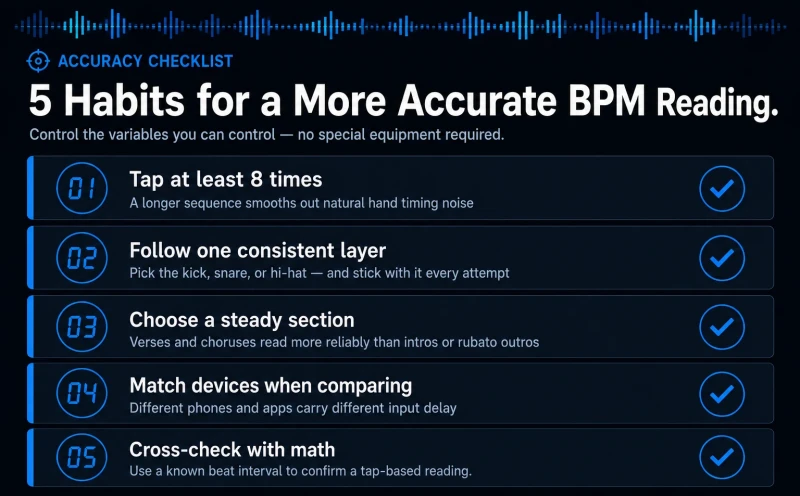
Getting a consistent, repeatable BPM comes down to controlling the variables you actually can control: how many taps you use, which part of the beat you follow, and how steady your environment is while you measure. None of these require special equipment, just a bit of intention before you start tapping.
Tapping Habits That Improve Consistency
A few practical adjustments make a noticeable difference:
- Tap more, not less. Aim for at least eight consistent taps before trusting the result, rather than stopping after two or three.
- Pick one consistent layer of the beat and stick with it. If you normally follow the kick drum, keep following the kick drum across every attempt so your results stay comparable to each other.
- Choose a stable section of the song. Verses and choruses with a steady groove give more reliable results than intros, outros, or sections with heavy rubato.
- Keep your device and setup consistent when comparing results with someone else. If you're troubleshooting a mismatch, try tapping on the same device to rule out latency differences.
Cross-Checking Your Result
If you already know the time between two beats, our BPM Calculator can confirm a tempo mathematically, which is useful for double-checking a tap-based reading that seems off.
If your number still shifts by a small margin between attempts, that's expected. A tight, well-averaged tap sequence typically lands within a few BPM of the true tempo, and that small margin is a normal feature of human-based measurement rather than a sign that something is broken.
Reconciling Two Different Readings
When your result and someone else's don't match, work through the possibilities in order rather than assuming the tool is unreliable. First, check whether one number is roughly double or half the other, which usually points to a subdivision or half-time disagreement rather than an actual timing error. Second, confirm you were both tapping to the same section of the song, since a bridge or breakdown can genuinely sit at a different feel than the chorus.
If those two checks don't explain the gap, retap together on the same device using each other's chosen beat layer. Opening Tap Tempo side by side and each tapping the same sound, such as only the kick drum, will usually close most of the remaining gap and reveal whether the original mismatch came from beat selection or from ordinary human variability.
Continue Learning
Now that you know what causes BPM readings to shift between attempts, put it into practice. Open Tap Tempo and tap along to the same song several times in a row, keeping your beat choice and device consistent. Watch how the number settles as your tap count grows, and you'll see your own timing become the most reliable measurement tool you have.
This article has been researched, written, and reviewed according to our Editorial Policy.
Frequently Asked Questions
Common questions about finding the BPM of a song.