
How to Find the BPM of Songs on Spotify, YouTube & Apple Music
Find song BPM on Spotify, YouTube and Apple Music. Compare native features, databases and no-download methods, then check results by tapping.
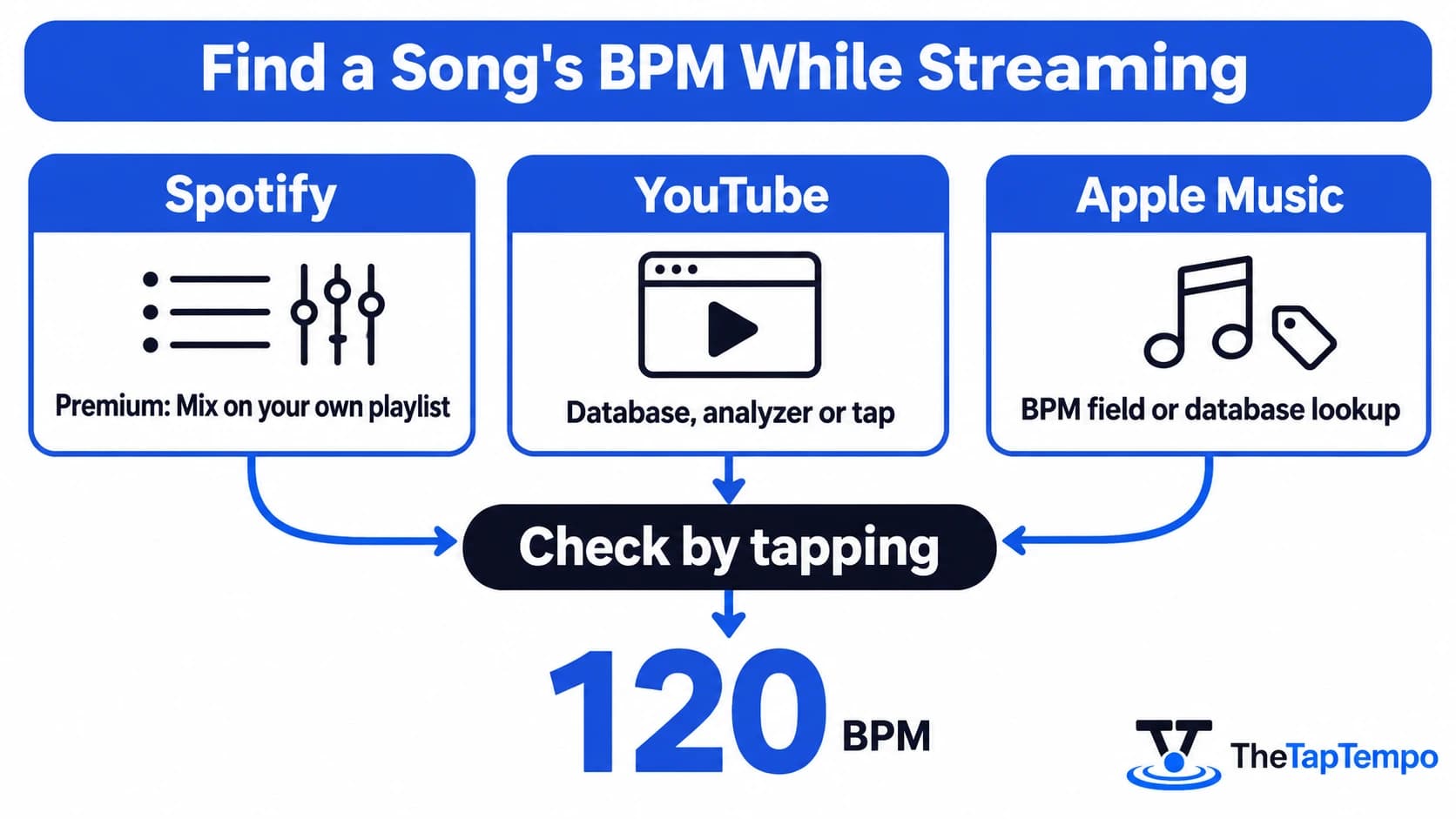
To find a song's BPM while streaming, use Spotify Premium's Mix display or search the exact recording in a BPM database. If the result is missing or sounds wrong, tap along to check the tempo of what is actually playing.
Each platform handles BPM differently. Spotify documents a BPM display in its Premium Mix workflow. YouTube does not document a BPM readout in its standard player. Apple Music's desktop apps offer a BPM field that may be empty. The streaming workflows below do not require ripping or downloading a song. Local-file analyzers are included separately for audio you already have permission to use. Platform documentation was reviewed on October 29, 2026.
Quick Answer: On Spotify Premium, select Mix on a playlist you created. On YouTube and Apple Music, look up the exact recording in a database, then tap along to confirm. If two sources differ by exactly a factor of two, they are probably counting the same pulse at different levels.
How to Find BPM on Spotify
Spotify Premium displays BPM and key in its Mixed Playlists workflow. Open a playlist you created and select Mix to see the values beside each song. Spotify's support page does not describe a BPM readout on the standard Now Playing screen, so outside Mix you need a database, a playlist tool or a manual tap.
Using Spotify Mix on Premium
Spotify's support pages for the United States, Canada, the United Kingdom and Australia describe the same workflow:
- Open a playlist you created, on desktop or mobile.
- Select Mix.
- Read the BPM and key shown beside each song.
Mix is a Premium feature, and free listeners get the regular playlist experience. Collaborative playlists can be mixed. Spotify also notes that Spotify Connect plays a mixed playlist as a regular playlist, while Bluetooth can support the mixed experience.
One limitation raised in the Spotify Community is BPM visibility before a track is added to a Mix. A practical workaround is a scratch playlist. Add the candidates, switch on Mix, read the numbers, and remove the songs that do not fit.
Looking Up a Spotify Song in a BPM Database
A public title-and-artist lookup does not require Spotify Premium. Search the exact recording on a site such as SongBPM, Tunebat or Chosic and you receive a stored value, not a fresh measurement.
That affects how much weight agreement carries. SongBPM credits Spotify for its song data, and Tunebat attributes its database values to Spotify. Two sites showing 124 BPM may be repeating one upstream number rather than confirming it. Version matching matters too. A radio edit, an extended mix and a sped-up remix can share a title and carry different tempos.
Playlist Tools and Browser Extensions
Some tools read a whole playlist. Brizm's playlist analyzer accepts a public Spotify playlist link, says it enriches Spotify metadata with its own feature database, and states that private playlists are not supported. Skiley says its playlist filter can narrow a playlist by BPM and other attributes. Test either on a small playlist first, because third-party tools change quickly.
Older tutorials often relied on Spotify's Audio Features and Audio Analysis endpoints. Spotify's November 27, 2024 developer announcement restricted those endpoints for specified new and development use cases, while treating qualifying existing extended-mode applications differently. New tools cannot assume access to Spotify's tempo endpoints, and availability depends on the app's access status. Some tools use independent data instead.
A browser extension is a later option, not a first one. One Chrome Web Store listing describes a current-track display with a limited number of free analyses per day and a subscription afterward. Read the permissions before installing, and remember that a developer's privacy disclosure is not an independent audit.
Spotify Running Mode and Playback Speed
Spotify introduced Running Mode in July 2026. Its August guidance describes availability for Premium listeners on iOS and Android in markets including the United States, Canada, the United Kingdom and Australia. Listeners can select a target BPM, and an optional setting adjusts song speed to match it.
If speed adjustment is on, a live tap or microphone reading reflects the adjusted playback, not the original recording. To check the original recording's tempo, turn the adjustment off.
Runners should also watch for half-time listings. A track listed at 85 BPM can support a 170-steps-per-minute cadence if you take two steps per beat, for example by letting the same foot land on each beat. If your target cadence is 170, search for tracks near both 170 and 85.
How to Find BPM on YouTube
YouTube does not provide a documented native BPM readout in its standard player, and its video API has no dedicated BPM field. To find tempo, use a database, an external analyzer or tapping. A BPM shown in a video's title or description is publisher-supplied information, not a measurement provided by YouTube.
Lookup, Titles and Descriptions
For an official release, search the artist and title in a BPM database and confirm that the version matches the video. This becomes less reliable when the exact version is missing from the catalog, such as a live recording, a mashup, a sped-up upload or an obscure sample. Producers asking about samples from YouTube describe this gap, and replies suggest a mix of lookups, file analysis, link tools and tapping.
Type beats and instrumentals often include a BPM in the title or description. That is publisher-supplied text, not a YouTube measurement. It may be rounded, copied from a template or wrong, so treat it as a starting point and tap to confirm.
Analyzing the Audio in the Tab
Some tools analyze the actual audio playing in a browser tab without asking you to save a song file. Music Tools Lab documents a workflow for a single public YouTube video, using tab-audio sharing that you approve in a desktop Chrome or Edge browser. It does not accept playlist, channel or search URLs.
Browser rules explain why this is not universal. MDN Web Docs states that getDisplayMedia(), the feature behind tab capture, has limited availability, requires a secure context and a user permission prompt, and may return no audio even when audio is requested. Do not assume tab capture works on every phone or browser.
Be careful with tools that accept a pasted link. YouTube Toolkit's BPM finder says it does not analyze audio waveforms, so a genre-based range from it is not a measured tempo. Audio AI Dynamics documents YouTube URL input alongside file upload, but check its free limits and data handling on its own page first.
When the track is a remix, sample or unreleased upload, you are measuring the upload itself, so pick a representative section. An intro or breakdown with sparse percussion may produce an ambiguous estimate even when the underlying tempo has not changed. If the recording actually changes tempo, analyze the section you need. No tool covered here is a verified way to analyze a whole YouTube playlist at once.
How to Find BPM on Apple Music
Apple Music's desktop apps support a BPM metadata field, but that does not mean every streamed song has a populated value. Apple documents the field in its Mac guide and Windows guide, including its use in workout Smart Playlists. The guides describe a place to store a number, not an automatic detector for every track, and they do not describe a BPM readout on iPhone.
Why the BPM Column May Be Blank
Blank columns are a recurring complaint. An October 2024 Apple Community thread describes a library with empty BPM values, and a 2022 thread describes a visible column with no values. These are user reports, not Apple statements, but they fit what the documentation describes.
The practical route is to find the value elsewhere. Look up the exact recording, tap along to confirm, then, where the BPM field is editable, enter the checked value in the song's information. Otherwise keep it in a separate playlist note or track list. For a large library, prioritize the tracks you actually need.
DJ Software With Apple Music
Algoriddim's djay integrates Apple Music and says the integration is available in 167 countries. Its analysis guide says tracks are analyzed when first loaded onto a deck, and that some streaming services cannot be pre-analyzed. That helps if you already DJ with it, but it is not a standalone BPM finder, and nothing in the documentation promises that djay's analysis appears in Apple Music's own BPM column.
Without Downloading Anything
Search the exact recording in a database, tap while listening, or use a microphone-based detector while the song plays through speakers. Tapping works with headphones because it needs only your ears. A microphone detector needs the music to reach the microphone.
Best Online Methods to Find a Song's BPM
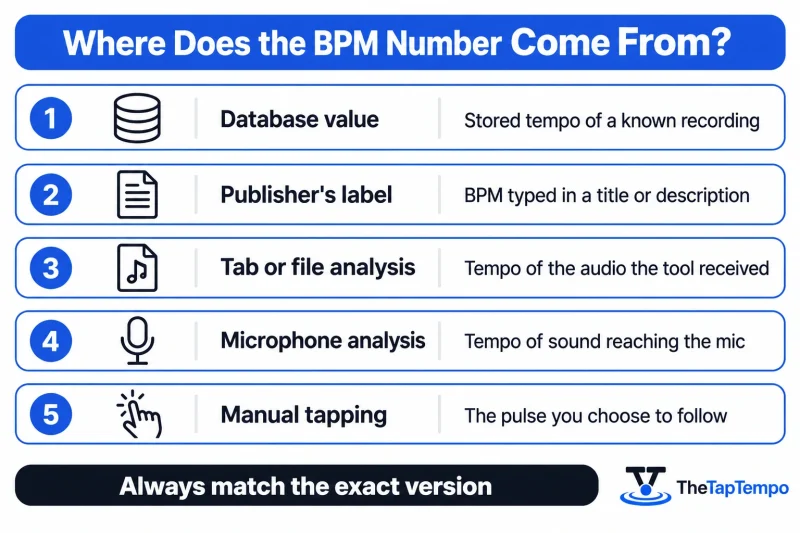
BPM results usually come from a stored value, a publisher's label, audio analysis, or manual tapping. Audio analysis may use a file, browser-tab audio or a microphone. The table below shows where each workflow's number comes from, which matters more than the brand of the tool.
| Workflow | Typical example | What the number reflects | What to watch for |
|---|---|---|---|
| Stored database value | SongBPM, Tunebat database, Chosic | The cataloged tempo of a known recording | Wrong version, shared upstream source |
| Publisher's label | BPM in a YouTube title | What the uploader claims | Missing, rounded or incorrect text |
| Tab or file analysis | Tab-audio analyzer, local-file analyzer | The audio the tool received | Section chosen, browser permissions |
| Microphone analysis | Browser microphone detector | Sound reaching the microphone | Room noise, speech, overlapping music |
| Manual tapping | Tap Tempo | The pulse you chose to follow | Beat selection, steady timing |
Databases and Analyzers
A database lookup is a convenient first step for many commercially released recordings. Its weaknesses are coverage and version mismatch, so confirm the artist, title and edit.
Analyzers need an audio signal. Tunebat's Analyzer processes local files and says they stay in the browser. It is separate from the database on the same site. Realtime BPM Analyzer lists file, microphone, stream URL and tapping inputs and describes in-browser processing. These are the tools' own statements, not independent audits. A local-file analyzer suits audio you already own or are licensed to use. It does not solve the streaming-only case.
Microphone Detection
A microphone tool listens to the room and estimates the beat while a song plays through speakers. Background noise, speech and a second song all muddy the signal, and the tool needs time to settle. The Realtime BPM Analyzer microphone example turns off echo cancellation, noise suppression and automatic gain control, which suggests that voice-call processing can interfere with music detection. If you play and capture on the same phone, test it first, since this is device dependent.
A constant delay between sound and detection shifts when the tool hears the beat, but it does not by itself change the BPM. A constant delay alone does not explain a different BPM. The estimate may instead reflect detection errors, input processing, or a different interpretation of the pulse.
Verifying With Tap Tempo
Tapping is a simple free way to check a streaming song's BPM without downloading it. Tap along to a clear, steady section with the free Tap Tempo tool, then repeat in a different section. Tapping works when you can hear and follow a reasonably clear pulse, and it needs no microphone. For a separate manual check, count beats over a timed interval and use the BPM Calculator.
Why BPM Tools Disagree
Tunebat states two reasons directly: its file-analysis algorithms differ from those behind its database values, and the analyzed files may differ. Other common causes are half-time or double-time counting, different versions of a song, a section that is not representative, and a tapper following a different rhythmic layer.
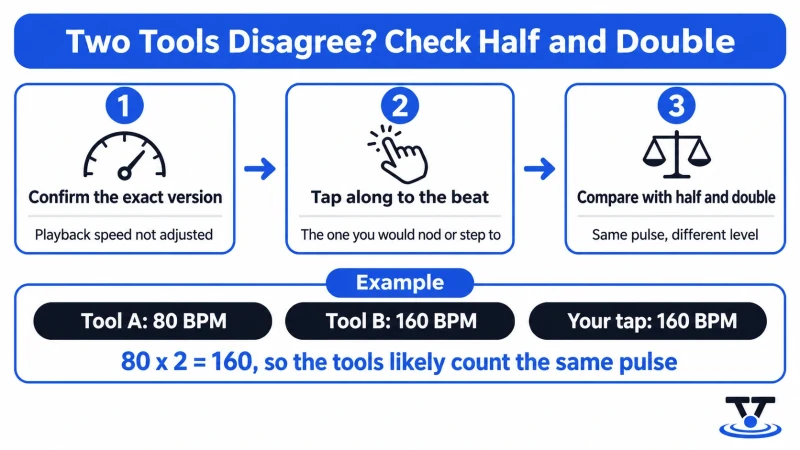
In an October 2025 r/Beatmatch thread, a listener reported a song at 80 BPM in Spotify and Tunebat but 160 in rekordbox. Replies discussed analysis ranges and half and double controls. It is a community report, not a controlled measurement, but the factor-of-two difference is consistent with counting the pulse at two levels.
To check a suspected half or double reading:
- Confirm the exact version and that playback speed is not adjusted.
- Tap along to the beat you would naturally nod or step to.
- Compare your result with each tool, and with half and double of it. If your estimate is close to half or double a listed value, the results may reflect different counting levels rather than a genuinely different tempo.
For DJing and production, choose the level that fits the task, and check the beat grid in your own software.
Need a quick BPM check while listening? Use our free Tap Tempo tool.
Which BPM-Finding Method Is Best?
The best method depends on the task. This table matches methods to what you are trying to do. No accuracy ranking is claimed, because that would require controlled testing of each tool.
| Method | Works while streaming? | Requires downloading audio? | Convenience | Main limitation |
|---|---|---|---|---|
| Spotify Premium Mix | Yes, in a playlist you created | No | Low friction for eligible users | Premium; not a standard-player display |
| Database lookup | Yes, beside any platform | No | Quick if the recording is cataloged | Coverage, shared sources, version mismatch |
| Manual tapping | Yes | No | No setup or import | Depends on your beat selection |
| Tab-audio analysis | Yes, in a compatible desktop browser | No saved file in the documented workflow | Extra permission steps | Browser support, selected section |
| Microphone analysis | Yes, if audible through speakers | No | Hands-free once set up | Room noise, device behavior |
| Authorized DJ software | Yes, with supported services | No user-supplied file for supported streams | Handy for existing DJ users | Subscriptions, service-specific analysis rules |
| Local-file analyzer | Not from a streaming link | Needs an authorized file | Good for audio you own | Does not solve streaming-only access |
| Metadata scanner | Yes, beside playback | No | Fast for labeled uploads | Reads text, does not measure audio |
Casual listeners: Spotify Mix or a database lookup, then a quick tap. That two-step habit can reveal obvious tempo mismatches.
DJs: Use your software's analysis on supported services and verify the beat grid. Treat a factor-of-two gap as a half or double question first.
Runners: Check whether Running Mode's speed adjustment is on, and search for both your cadence and half of it. A track listed at 85 BPM may suit a 170-step cadence when you follow two steps per beat.
Producers, creators and editors: Match the exact version in your project, and tap against the audio you will use, in the section you plan to cut or sync.
Continue Learning
Continue building your tempo skills with these guides:
This article has been researched, written, and reviewed according to our Editorial Policy.
Frequently Asked Questions
Common questions about finding the BPM of a song.