
Latency vs Musical Timing: Why Milliseconds Matter in Recording and Mixing
Latency and musical timing both use milliseconds, but they mean different things. Learn to tell system delay from intentional timing when recording and mixing.
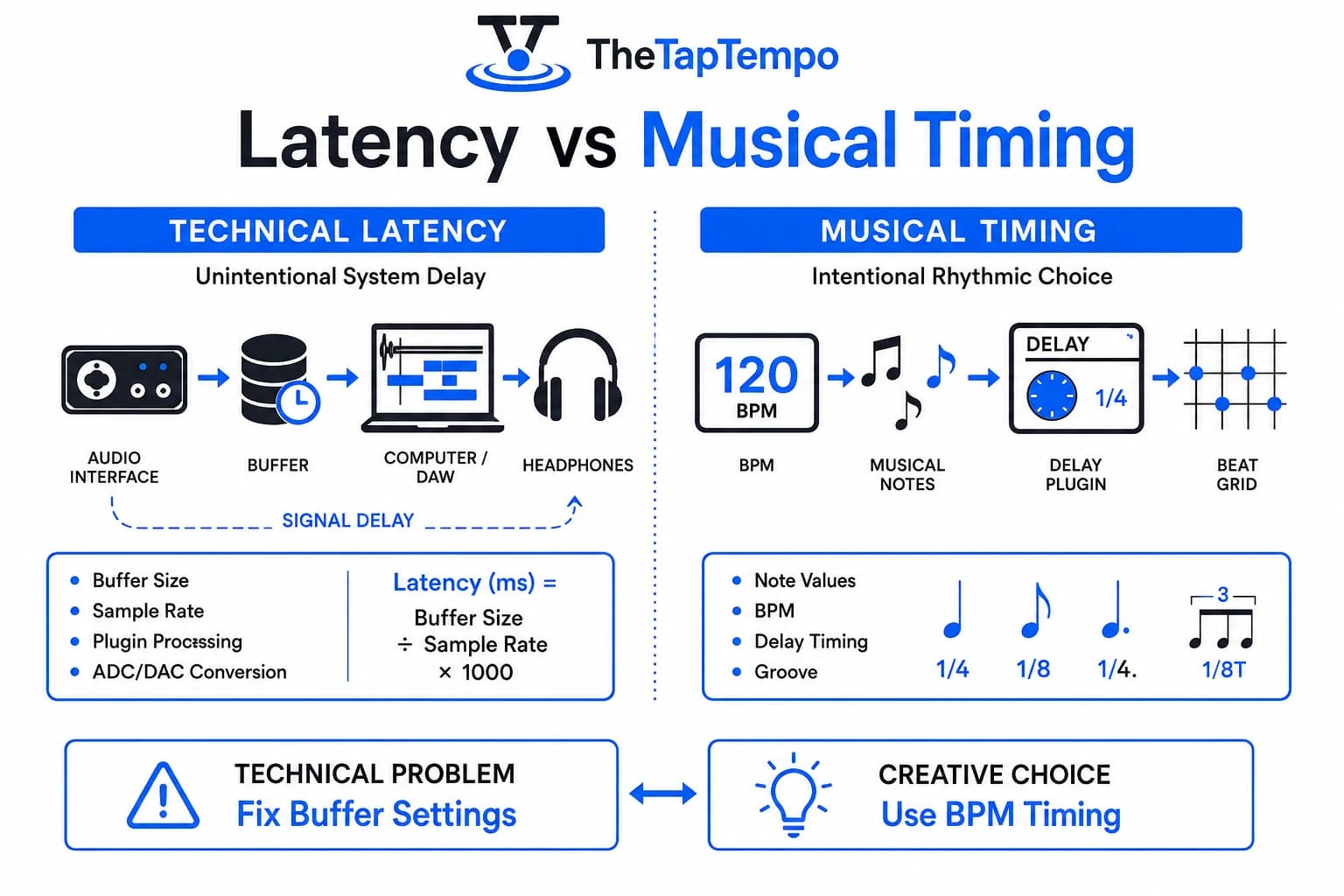
A vocalist hears her own voice arrive a beat late in her headphones. A guitarist feels like his playing is dragging behind the track, even though the recording sounds fine on playback. Both situations get blamed on "timing," but only one of them is actually a timing problem. The other is latency, and confusing the two leads producers toward the wrong fix.
This article separates technical latency, the delay a digital audio system adds on its own, from musical timing, the intentional relationship between events in a performance. Along the way, you'll see why milliseconds show up in both contexts without meaning the same thing.
| Technical Latency | Musical Timing | |
|---|---|---|
| Definition | Delay introduced unintentionally by the audio system's signal path | An intentional rhythmic relationship chosen by the musician or producer |
| Primary Cause | Buffer size, sample rate, ADC/DAC conversion, plugin processing | A creative decision tied to the song's tempo and desired feel |
| How to Adjust/Fix | Lower the buffer size, use direct/hardware monitoring, reduce plugin load | Choose a musical note division and apply it deliberately |
| Formula | Latency (ms) = (Buffer Size ÷ Sample Rate) × 1000 | Calculated from project BPM using the BPM to Milliseconds Calculator |
| Who Experiences It | Performers monitoring in real time, engineers tracking through a DAW | Listeners and producers shaping how an effect sits against the beat |
What Is Audio Latency?
Audio latency is the elapsed time between an audio event entering a digital system and that same event becoming audible or usable at the other end. It exists because digital audio has to be converted, buffered, and processed before a performer or listener hears it, and every one of those stages takes a measurable amount of time.
The Digital Audio Signal Path
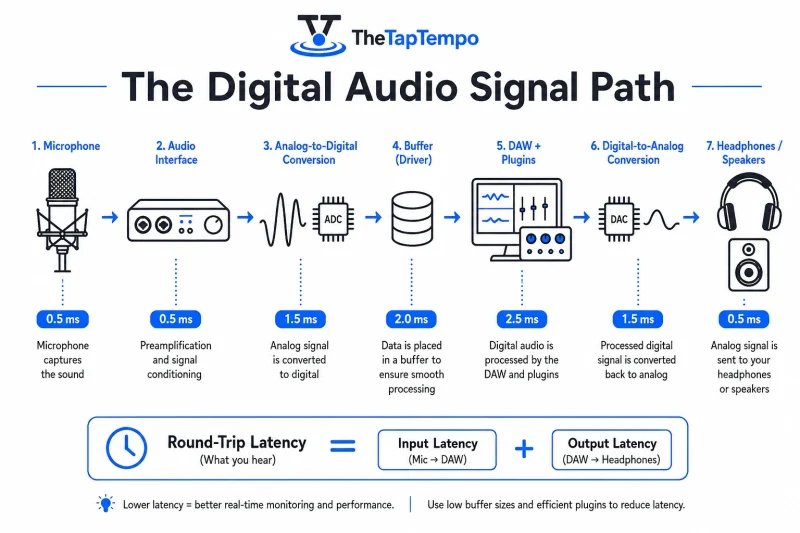
A signal doesn't reach your speakers or headphones instantly, even in a well-optimized system. It travels through analog-to-digital conversion, sits briefly in a buffer, passes through the DAW and any active plugins, gets converted back to analog, and finally reaches the monitoring path. Ardour's user manual specifically identifies analog-to-digital and digital-to-analog conversion as contributors to total latency, alongside the buffering and processing stages in between.
Input, Output, and Round-Trip Latency
Input latency is the time a signal takes to enter the system and become available to the software. Output latency is the time a processed signal takes to leave the software and reach the physical output. Round-trip latency is the combination of both, and it's what a performer actually experiences when monitoring their own input through the DAW. Sound On Sound describes round-trip delay in exactly these terms, as the sum of input and output latency working together.
Quick Answer: Input latency covers the signal going in, output latency covers it coming back out, and round-trip latency is the full journey a performer hears while monitoring through the DAW.
Why Latency Is Measured in Milliseconds
Latency is measured in milliseconds because it describes elapsed time, and milliseconds give engineers a consistent, human-readable unit regardless of which interface or sample rate is involved. Focusrite's own support documentation confirms that latency may be displayed in either samples or milliseconds, with the buffer size and sample rate together determining the resulting value.
Samples vs Milliseconds
Digital audio is fundamentally counted in samples, not time. A buffer holds a fixed number of samples, and that same buffer size represents a different length of real time depending on the sample rate in use. The relationship is straightforward: Latency (ms) = (Buffer Size ÷ Sample Rate) × 1000.
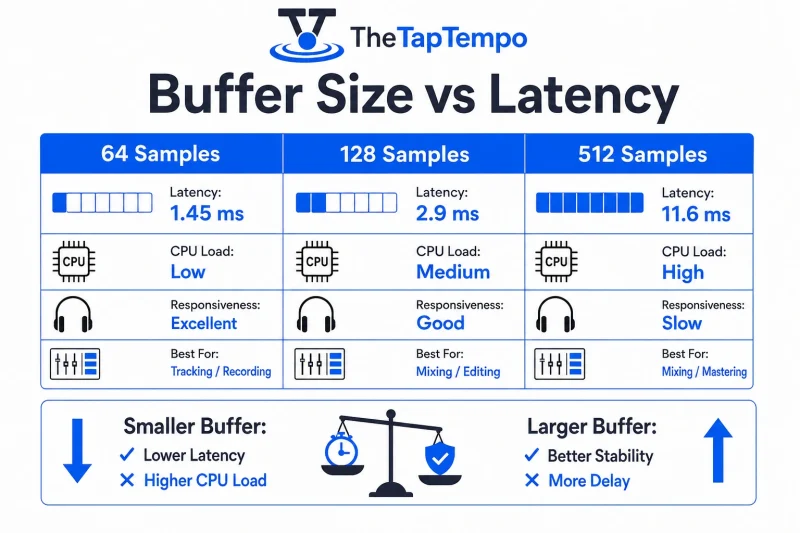
A 64-sample buffer at a 44.1kHz sample rate works out to roughly 1.45 ms of input latency, tight enough that most performers won't notice it. Push the same session to a 512-sample buffer, still at 44.1kHz, and that number climbs to about 11.6 ms, before output latency, plugin processing, and conversion stages are even added on top. Sample rate changes the picture too: that same 64-sample buffer at 96kHz drops to roughly 0.67 ms, which is why two sessions with identical buffer settings can feel noticeably different depending on the sample rate underneath them.
Why the Same Unit Doesn't Mean the Same Concept
Latency and musical timing are both expressed in milliseconds, but that shared unit is a coincidence of measurement, not a sign that the two concepts are related. One describes a delay the system introduces without being asked. The other describes a delay a musician or producer chooses on purpose.
Musical Timing vs Technical Delay
Latency is an unintended delay introduced by the audio system itself, existing entirely on the technical side of the signal path. Musical timing is an intentional relationship between events in a performance or arrangement, chosen deliberately rather than caused by hardware or software processing. Confusing the two means troubleshooting a buffer setting when the real issue is a creative choice, or vice versa.
Producer Tool Once you're working with musical timing rather than diagnosing system delay, the BPM to Milliseconds Calculator converts a song's tempo into the precise millisecond values your plugins need.
When Milliseconds Signal a Problem
A vocalist hearing her own voice arrive late through headphones is experiencing latency, not a timing choice. A guitarist playing through a software amp simulator and feeling like the response lags behind the pick attack is dealing with the same thing. In both cases, the delay comes from the signal path, not from anything either performer intended.
When Milliseconds Signal a Choice
A delay effect set to a dotted eighth note, or a rhythmic pattern built around a specific project tempo, is also measured in milliseconds under the hood. This is musical timing, not latency, because the value was chosen for its rhythmic effect rather than caused by system processing.
Producer Tool Working from a known project tempo? The BPM Calculator confirms it. Working from a reference track with no known tempo? Tap Tempo measures it by ear.
Why a Delayed Feeling Doesn't Always Mean a Timing Error
Feeling behind the beat while monitoring doesn't automatically mean the recorded take is out of time. Many performers unconsciously play slightly ahead to compensate for a monitoring delay they can feel but not necessarily identify, which means the actual recorded waveform can still land close to where it should, even though the take felt uncomfortable to perform. Whether a specific recording needs timing correction is a separate question from whether the monitoring experience felt delayed.
How Buffer Size Affects Latency
Buffer size directly controls latency because a larger buffer holds more audio before processing it, giving the computer more time per block at the cost of added delay between input and output. A smaller buffer processes audio in tighter chunks, which lowers the delay but demands more from the CPU per unit of time. Every major DAW, including Logic Pro, Cubase, Ableton Live, and REAPER, exposes this setting inside its audio preferences, even though the exact menu location and terminology differ slightly between them.
Why Smaller Buffers Feel More Responsive
Universal Audio's documentation identifies the host's input and output buffer size as a primary source of latency when monitoring an input signal or playing a software instrument in real time. Lowering that buffer size is usually the first thing engineers try when monitoring feels delayed, because it directly shortens how much audio has to accumulate before it's processed.
A vocalist tracking through a session running a 256-sample buffer at 48kHz experiences roughly 5.3 ms of input latency alone, before output latency, plugin processing, and conversion add anything on top. That is often enough, once the full round trip is accounted for, to make close rhythmic phrasing or tight harmony stacking feel slightly disconnected, even though 5.3 ms looks small on paper.
Why Smaller Buffers Can Cause Clicks and Dropouts
A smaller buffer gives the system less time to process each block of audio, which raises the risk of clicks, pops, or dropouts if the CPU can't keep up. Universal Audio's hardware settings documentation frames this as a trade-off rather than a one-directional improvement: pushing the buffer too low can destabilize a session even though it technically reduces latency.
Direct Monitoring vs Software Monitoring
Direct or hardware monitoring routes the input signal through the audio interface itself, bypassing the DAW's software processing path entirely, which is why it can feel immediate regardless of the session's buffer setting. Universal Audio documents this distinction directly, noting that monitoring through dedicated interface software can sidestep the DAW's input/output buffering in supported workflows. Software monitoring, by contrast, sends the signal through the DAW, which means it inherits whatever latency the buffer setting introduces.
Interface manufacturers differ in how they prioritize this. RME and MOTU are frequently chosen by engineers specifically for low-latency driver performance and stable direct monitoring, alongside the Focusrite and Universal Audio implementations already discussed above. The underlying principle stays the same across brands: direct monitoring removes the DAW from the monitoring path for that specific signal, regardless of which manufacturer built the interface.
The right monitoring approach depends on the situation:
- Vocal monitoring through the DAW benefits from a low buffer setting, since the performer needs to hear themselves without a noticeable lag.
- Guitar or bass through software amp modeling needs low enough latency that picking and note response feel connected, since the processing itself already adds some delay.
- Virtual instrument performance is buffer-sensitive in the same way, because every played note passes through the DAW before triggering sound.
- Direct or hardware monitoring sidesteps the buffer question for the monitored signal, which is useful when a session's buffer is set higher for CPU-heavy mixing work.
Quick Answer: Lower buffers reduce monitoring delay but stress the CPU more; direct monitoring avoids the DAW's buffer path entirely for the signal being monitored, regardless of the session's buffer setting.
What's Considered Good or Bad Latency?
Acceptable latency depends on the performer, the instrument, the monitoring method, and the task, which is why a single universal number doesn't hold up under research scrutiny. What counts as usable for a mixing engineer reviewing a session is different from what counts as usable for a vocalist tracking a take in real time.
Why a Single "Good" Number Doesn't Exist
A peer-reviewed study on network music performance found that participants tolerated latency closer to 40 milliseconds under the conditions tested, well above the 25 to 30 millisecond figure often repeated as a rule of thumb. Separate experimental research found acceptable latency varying from roughly 1.4 milliseconds up to 42 milliseconds depending on the instrument and situation involved. A study focused on action-to-sound latency reached a similar conclusion: the relevant perceptual threshold shifts by task, and it cannot be reduced to one number that applies everywhere.
Practical Latency Ranges by Task
Lower latency is generally preferred for real-time monitoring and playing software instruments, since the performer is reacting to what they hear in the moment. Higher latency is more likely to feel distracting specifically when monitoring through the DAW's software path, where the delay sits directly between playing a note and hearing it. Ardour's documentation suggests latency below 5 milliseconds tends to suit professional recording contexts, though it frames this as one data point within a full signal path rather than a fixed target. Mixing generally tolerates higher latency comfortably, because the engineer isn't required to respond to the monitored signal in real time the way a performer is while tracking.
Common Latency Myths
- "A smaller buffer is always better." A smaller buffer reduces latency, but it also increases CPU load per block, and pushing it too low invites clicks, pops, or dropouts instead of a cleaner recording experience.
- "All milliseconds mean the same thing." A millisecond describing system latency and a millisecond describing a synced delay repeat come from entirely different sources, one from processing time and one from a deliberate musical choice.
- "A low number in the DAW means monitoring is instant." A displayed latency value reflects what the software reports, not necessarily an independently measured end-to-end delay across the full signal path, including drivers and conversion stages the display may not fully capture.
- "Plugin latency is the same as interface latency." A plugin can add its own processing delay inside the DAW's signal chain, separate from whatever latency the interface and buffer setting introduce. Most modern DAWs include a feature called plugin delay compensation, which automatically shifts other tracks so everything lines up correctly on playback, even though the performer still heard the plugin's added delay in real time while tracking.
- "Direct monitoring fixes the DAW's latency problem." Direct monitoring removes the DAW's software path for the specific signal being monitored, which helps a great deal, but it doesn't eliminate latency elsewhere in the chain, particularly if the monitored signal still needs DAW-based processing applied to it.
- "A high-latency take is automatically out of time." As covered earlier, a performer can compensate for a delay they feel without necessarily placing the actual recorded audio out of position, so a distracting monitoring experience and a genuine timing error are related but separate problems.
Producer Tool Once technical latency and musical timing are separated, applying synced timing values creatively is a job for the Delay & Reverb Time Calculator.
Understanding latency changes how you troubleshoot a session. A vocalist who feels behind the beat needs a buffer or monitoring fix, not a timing correction on the take. A producer who wants effects to feel intentionally synced to the song, on the other hand, is working with musical timing rather than latency at all.
Producer Tool Once you know a project's tempo, the BPM to Milliseconds Calculator converts it into the precise millisecond values your plugins need for synced timing.
Continue Learning
Explore more guides on music production timing and effects:
This article has been researched, written, and reviewed according to our Editorial Policy.
Frequently Asked Questions
Common questions about finding the BPM of a song.