
Why Tempo-Synced Effects Sound Better Than Manual Timing
Learn what tempo-synced effects actually do, why manual timing drifts out of sync, and which effects benefit most from following your song's tempo.
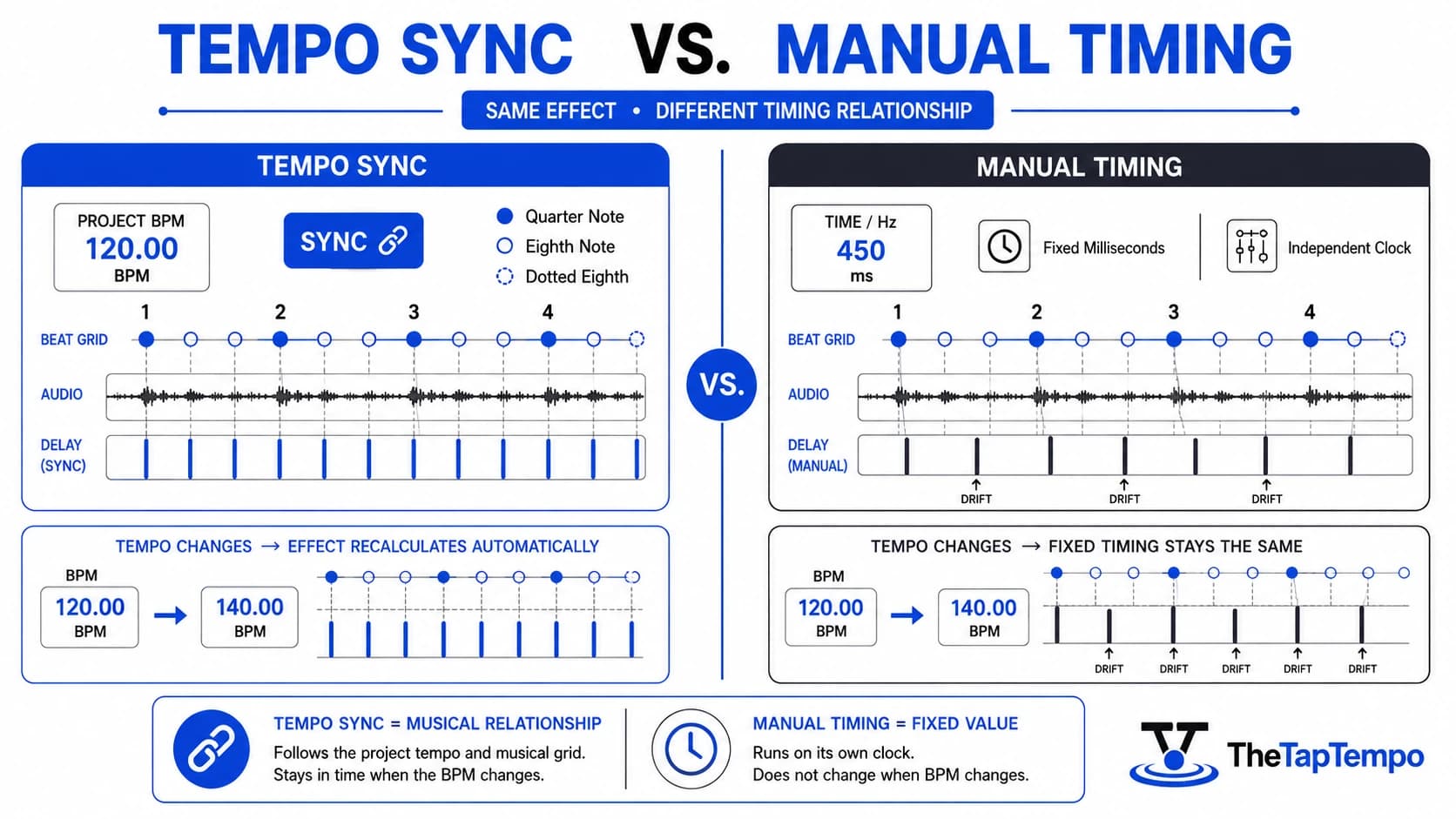
Delay repeats that land in awkward gaps. Tremolo that pulses against the groove instead of with it. Auto-pan movement that feels random rather than musical. Almost every producer has run into one of these problems, and the cause is usually the same: an effect running on its own clock instead of the song's.
This article explains what tempo synchronization actually does, why manually set timing values tend to drift away from the beat, and which effects benefit most from following the project tempo. Once the concept is clear, you'll know exactly when to reach for the BPM to Milliseconds Calculator to turn that tempo into precise timing values.
What Does Tempo Synchronization Mean?
Tempo synchronization links an effect's timing, such as a delay repeat or a modulation cycle, to the song's project tempo instead of a fixed, independently chosen value. When an effect is synced, its rate is expressed as a musical division, like a quarter note or a dotted eighth note, rather than a number of milliseconds or Hertz that stays the same no matter what the song is doing.
How Plugins Expose Sync Controls
Plugins expose this behavior through a control usually labeled Sync, alongside a Time or Hz mode that lets the same parameter run freely instead. Steinberg's Cubase documentation describes how the host application delivers tempo information to plugins so that parameters such as delay time and modulation rate can be expressed in straight, dotted, or triplet note values rather than raw time. FL Studio's Fruity Delay 3 works the same way, with echoes that automatically follow the project tempo, including through tempo automation.
Sync as a Relationship, Not Just a Rate
Tempo sync establishes a relationship rather than simply speeding up or slowing down a parameter. A synced eighth-note delay isn't just "faster" than a synced quarter-note delay; it repeats twice as often within the same musical measure, so it sits inside the beat grid in a specific, predictable way.
Quick Answer: Tempo sync links an effect's timing to the project's BPM using musical note divisions, so the effect always lands in a consistent rhythmic relationship with the song, even if the tempo changes.
Why Manual Effect Timing Often Sounds Unnatural
Manual timing drifts out of alignment the moment the project tempo changes, because it sets a delay, LFO, or modulation rate in fixed milliseconds or Hertz rather than a musical division. It works fine at the exact tempo it was set for, but any tempo shift, even a small one, breaks the relationship between the effect and the beat.
Why Drift Sounds Like a Messy Mix
That drift is usually what people mean when they describe a mix as sounding "off beat" or "messy." The individual sounds might be well recorded and well processed, but the ear picks up on the fact that the repeats or pulses no longer line up with where the beat is expected to land. Peer-reviewed research on rhythmic synchronization has found that the timing separation between events measurably affects a listener's ability to track and coordinate with a rhythm, which supports why consistent, predictable spacing reads as "in time" while irregular spacing reads as drift.
When Manual Timing Is Still the Right Choice
Manual timing isn't wrong on its own; it becomes a problem only when the effect is expected to reinforce a repeating pulse. A slow, evolving pad might use a free-running LFO on purpose, because the goal is movement that feels organic rather than locked to the grid. If the effect's job is rhythmic, though, manual timing works against the very thing the listener's ear is trying to follow.
Tempo Sync vs. Beat Sync: A Key Distinction
Tempo-accurate timing and beat-accurate phase are related but different things. A 2007 NIME research paper on real-time beat-synchronous audio effects draws this exact distinction: tempo synchronization matches the time between beats, while beat synchronization also accounts for where each beat actually falls. An effect can be tempo-accurate in its rate and still feel disconnected if its starting phase doesn't line up with the beat itself.
Which Audio Effects Benefit from Tempo Sync?
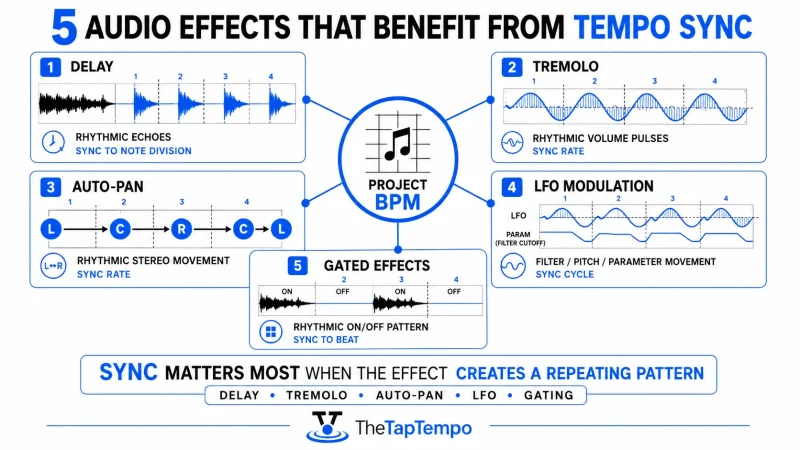
Sync matters most for effects whose timing is heard as a repeating or periodic pattern, because that's exactly the kind of pattern a listener's ear compares against the song's pulse. Not every parameter on every plugin needs to follow the tempo, but five effect types benefit consistently.
Quick Answer: Delay, tremolo, auto-pan, LFO modulation, and gated effects all rely on a repeating cycle, which is exactly why syncing them to the project tempo makes such an audible difference.
Delay
A delay's repeat rate determines how the echoes space themselves against the beat, which makes it the most obvious tempo-sync case. A synced delay set to a dotted eighth note, for example, creates a well-known bouncing rhythm that reinforces the groove instead of competing with it. Once you've settled on a division that works, the Delay & Reverb Time Calculator turns that same synced value into a full delay-and-reverb chain.
Tremolo
Tremolo's rate is heard almost like a second layer of rhythm sitting on top of the source material, because the effect works by rhythmically varying volume. When that rate is synced to a musical division, the pulsing feels intentional; when it isn't, it can feel like the instrument is fighting the drums. Plugins such as Soundtoys' Tremolator and Waves' modulation tools both expose this same Sync-versus-Hz choice on their rate control.
Auto-Pan
Auto-pan creates rhythmic movement across the stereo field in the same way tremolo creates rhythmic movement in volume. A synced auto-pan lines that movement up with the beat, which is especially noticeable on rhythmic elements like plucked synths or guitar parts.
LFO Modulation
LFO modulation can drive many parameters, from filter cutoff to pitch, and whether it's synced changes how those parameters behave entirely. Logic Pro's documentation notes that LFO controls can be set to follow the project tempo or run freely, which is a direct illustration of the same Sync-versus-manual choice found across most DAWs and plugin formats.
Gated Effects
Gated reverbs and rhythmic gating tools depend on tempo sync almost by definition, since the entire effect is built around chopping a sound into a pattern of on-and-off segments. Valhalla's gated reverb plugins default to Sync mode for this reason: without it, the gate pattern has no reliable relationship to the song at all.
At 120 BPM, for reference, a dotted eighth-note delay works out to roughly 375 milliseconds. That number only matters as an example here; the point is that synced effects express this relationship as "dotted eighth" rather than a fixed millisecond value that has to be recalculated by hand every time the tempo changes.
How Modern DAWs Synchronize Plugins
A synced parameter updates automatically whenever the project tempo changes because every major DAW sends tempo and transport information from its host clock to any plugin that requests it. Cubase's documentation describes this host-to-plugin tempo delivery directly, including support for straight, dotted, and triplet note values across compatible parameters. Ableton Live, Logic Pro, FL Studio, and REAPER all implement a version of the same idea, even though the interface language varies slightly between them.
Switching Between Time Mode and Sync Mode
Switching a delay or modulation control from Time or Hz mode to Sync mode usually reveals a dropdown of musical divisions instead of a numeric field. Selecting a division tells the plugin to calculate the actual millisecond or Hertz value continuously, based on the current tempo, rather than storing a fixed number. A manually set parameter never recalculates; a synced one does, automatically, the moment the tempo changes later in the arrangement.
Quick Answer: Sync mode asks "what beat division should this match?" while Time or Hz mode asks "what fixed number should this use?" FabFilter and other plugin manufacturers make this distinction explicit in their own documentation.
Why Sync Alone Doesn't Guarantee Phase Alignment
Tempo synchronization on its own only guarantees the rate is tempo-accurate; it does not guarantee the effect's starting position, or phase, lines up with the beat. Two synced effects can technically match the tempo and still feel slightly disconnected from each other if one starts a fraction of a beat later than the other, which is a separate issue from tempo sync itself.
Common Tempo Sync Mistakes
Most sync-related problems come from a handful of recurring habits rather than a fundamental misunderstanding of the feature.
- Leaving a rhythmic effect in Time or Hz mode. If the effect's job is to reinforce a repeating pulse, free-running timing works against that goal from the start.
- Choosing an unsuitable division. Sync being enabled doesn't guarantee the right result; a dotted eighth-note delay and a straight quarter-note delay create very different rhythmic feels on the same material.
- Using the wrong project BPM. A synced effect is only as accurate as the tempo it's syncing to, so an incorrect project tempo carries the error into every synced parameter. Confirm a known tempo with the BPM Calculator, or measure it directly with Tap Tempo if you're working from a reference track without a confirmed BPM.
- Assuming sync guarantees phase alignment. As covered above, tempo-accurate timing and beat-accurate phase are related but separate concepts. One detail worth knowing: a synced effect's phase is typically calculated from the session's bar-and-beat position, not from the moment playback starts. That's why starting playback from beat 3 of a bar instead of beat 1 can make an otherwise correctly synced delay or tremolo land differently than expected. The rate is still accurate; the reference point has just shifted.
- Syncing everything by default. Enabling Sync on every plugin without listening for whether the effect actually needs a rhythmic relationship can strip out movement that was musically useful.
- Comparing Sync and Time modes unfairly. A meaningful comparison keeps depth, feedback, and wet level identical and changes only the timing mode; otherwise it's hard to tell what actually caused the difference.
When You'll Need a BPM to Milliseconds Calculator
You need an exact millisecond or Hertz value when a plugin doesn't offer a built-in Sync button, which is exactly the gap the BPM to Milliseconds Calculator closes. Turning the project's BPM into a precise timing value is the practical step that follows once you've decided an effect should reinforce the beat.
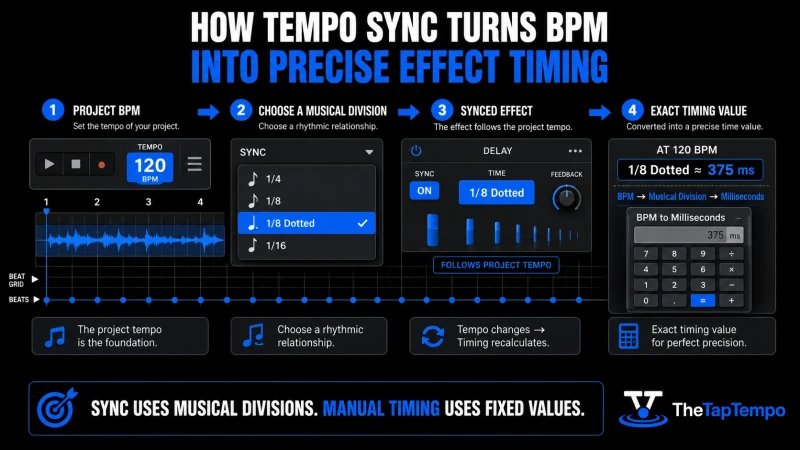
Use it whenever a plugin lacks automatic sync, or when you want to manually dial in a specific division for creative reasons rather than relying on the plugin's built-in calculation. Enter the project's BPM and the division you settled on, and it returns the exact number your plugin's Time or Hz field needs.
Continue Learning
Explore more guides on music production timing and effects:
- What Are Milliseconds in Music?
- Understanding Note Values
- Why Songs Don't Have One Fixed BPM
- How to Increase Playing Speed With a Metronome
Understanding why tempo sync works is what makes the setting useful instead of just another button. Once you can hear the difference between an effect that follows the beat and one that's simply running on its own clock, the choice between Sync mode and manual timing becomes a musical decision rather than a guess. From here, the BPM to Milliseconds Calculator gives you the exact values to carry that decision into any plugin, synced or not.
This article has been researched, written, and reviewed according to our Editorial Policy.
Frequently Asked Questions
Common questions about finding the BPM of a song.